
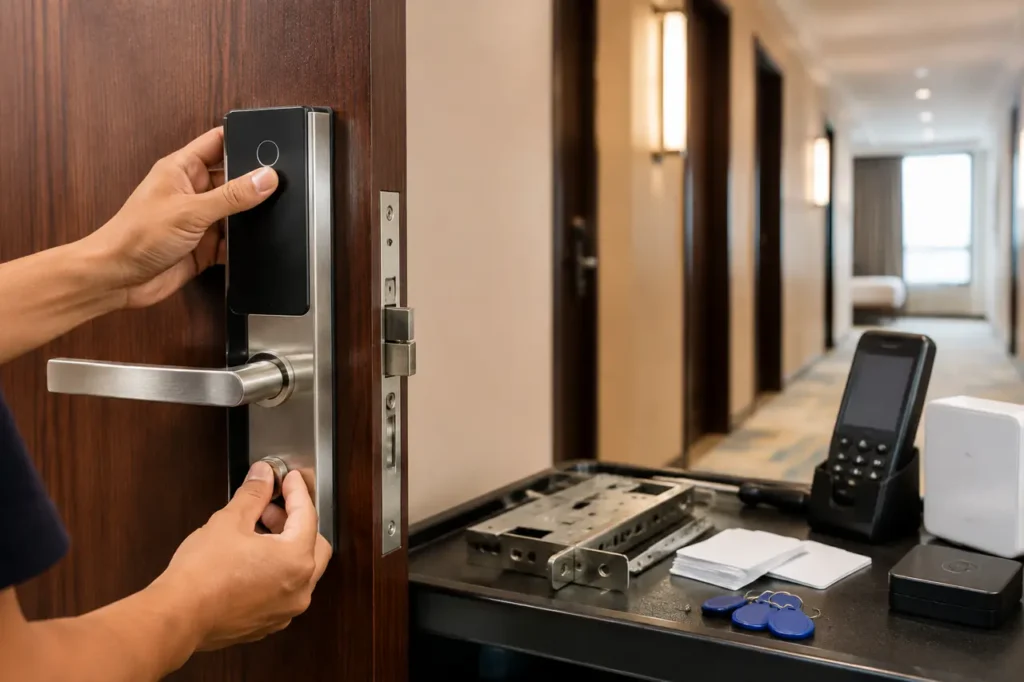
A 40-room inn can turn a low-cost lock purchase into a front-desk failure if it deploys residential Wi-Fi deadbolts instead of a hotel smart lock system.
Lost credentials, battery alerts, room moves, staff access, emergency entry, and guest check-out all need to work as one operating system, not as dozens of separate mobile apps.
The Core Standard: Commercial vs. Consumer Smart Locks
Do not use consumer Wi-Fi deadbolts as a substitute for commercial lodging access control. They are built around single-home administration, not room assignment, staff permissions, encoder workflows, PMS events, or multi-property audit requirements.
A commercial hotel system combines lock hardware, credential issuance, management software, emergency access procedures, and door-preparation requirements. That distinction matters more than a long feature list. A lock that opens by phone is not automatically suitable for a hotel.
Why Grade 1 hardware belongs in the specification
ANSI/BHMA Grade 1 is a common procurement benchmark for high-traffic commercial door hardware. It indicates that the hardware has been tested to a higher performance category than residential-grade products.
Buyers should request the exact test documentation and confirm that the quoted lock configuration, not merely a related product family, carries the stated rating.
Grade 1 does not replace local code review. Door assemblies still need to meet applicable fire, life-safety, accessibility, and emergency mechanical egress requirements. A guest must be able to exit without relying on an app, card, network connection, or staff intervention.
- Specify commercial-grade locks for guest rooms, connecting doors, staff offices, and restricted amenity areas.
- Confirm single-motion exit operation with the installer and authority having jurisdiction where required.
- Ask whether the quoted handle, mortise body, latch, strike, and trim are included in the Grade 1 claim.
- Require an emergency mechanical override procedure with controlled key management.
The mistake: comparing lock price instead of system scope
A consumer lock quote can look attractive because it excludes the costly operational pieces: card encoders, management software, staff credentials, gateway hardware, integration work, replacement parts, and installation support. Those omissions surface after the doors have already been drilled.
For a commercial deployment, begin with a purpose-built Hotel Door Lock System category rather than adapting residential products. Interoperability also matters where locks connect with broader access platforms, mobile credentials, or property technology; review smart lock interoperability considerations with a commercial-use filter.
Evaluating Guest Access Technologies
The best guest credential depends on check-in flow, guest profile, staffing model, and the property budget for software and support.
Many hotels use more than one method: RFID for dependable daily operations, BLE mobile access for digital check-in, and PIN credentials for selected unstaffed or short-stay workflows.
| Access Type | Initial Hardware Cost | Ongoing Management Cost | Guest Experience | Best For |
|---|---|---|---|---|
| RFID key card | Moderate: locks, encoder, cards, management software | Low to moderate: replacement cards and encoder administration | Familiar, fast, works without a guest smartphone | Full-service hotels, resorts, properties with front desks |
| Mobile/BLE | Moderate to higher: compatible locks, mobile credential platform, possible gateways | Moderate: platform support, integration, guest enrollment support | Convenient for digital check-in, but depends on guest phone use | Boutique hotels, business hotels, digitally managed properties |
| PIN keypad | Moderate: keypad lock or keypad credential module | Moderate: code issuance, expiry controls, support for mistyped codes | No physical card required, but code sharing is a risk | Unstaffed boutiques, serviced apartments, selected back-of-house doors |
What this means: RFID remains the dependable baseline for many properties. Mobile access can improve arrival flow, but it should complement rather than abruptly replace a credential path guests and staff can use during phone, app, or connectivity problems.
RFID is simple only if card standards match
RFID key cards work well because front-desk teams understand the process and guests do not need an application. Confirm the credential technology, such as Mifare-compatible cards where applicable, encoder compatibility, card stock, and whether old cards can be migrated or must be replaced.
- Request samples of guest cards, staff cards, master credentials, and emergency credentials.
- Confirm how lost-card cancellation works and whether replacement cards invalidate prior cards immediately.
- Ask whether encoders can issue room, elevator, parking, amenity, and back-of-house permissions in one workflow.
- Plan spare encoders and card inventory for front desk continuity.
BLE improves arrival flow, not every guest journey
Bluetooth Low Energy (BLE) mobile access can deliver hospitality keyless entry without asking guests to collect a physical card first. It is particularly useful for mobile check-in, late arrivals, and properties that want fewer front-desk touchpoints.
The trade-off is adoption and support. Guests may decline app installation, arrive with a depleted phone battery, disable Bluetooth permissions, or use an unsupported device.
Require an alternate credential path, clear front-desk recovery steps, and defined support ownership between the PMS provider, mobile-key platform, and lock supplier.
PIN credentials suit controlled use cases
Temporary codes avoid lost cards, but a shared code has weaker accountability than a named card or phone credential. Use expiry settings, code-length rules, and reissue procedures.
PIN access often fits maintenance spaces, short-stay units, or limited-service properties better than a large luxury hotel with complex guest privileges.
Property Management System (PMS) Integration Levels
A smart lock is only as useful as its relationship with the PMS and front-desk workflow. The right integration reduces manual steps at arrival and departure. The wrong one leaves staff re-entering booking data, manually encoding cards, and resolving access errors across disconnected systems.
| Integration Level | Capabilities | Target Property Type |
|---|---|---|
| None / Standalone | Manual room setup and card encoding; no booking-data exchange | Small inns, simple motels, low-complexity properties |
| Basic 1-Way | Selected reservation details move from PMS to lock software; staff still confirm or issue credentials | Midscale hotels with staffed reception and standard room operations |
| Advanced 2-Way API | Automated credential provisioning, digital check-in support, room-status events, checkout revocation, and synchronized updates where supported | Luxury resorts, larger hotels, multi-building properties, technology-led operations |
A 2-way PMS integration can support automatic mobile-key delivery after a valid digital check-in and revoke access when a stay ends. Confirm the exact event sequence, however. “PMS compatible” can mean anything from exporting a guest name to a fully supported two-way integration.
Ask what happens during exceptions, not normal check-in
Normal reservation creation rarely reveals integration risk. Ask the supplier to demonstrate a room move, late checkout, early departure, duplicate guest credential, canceled booking, offline front desk, and staff reassignment. Those are the moments where manual workarounds become visible.
- Name the PMS product, installed version, interface method, and hosting arrangement.
- Confirm whether integration fees, API licenses, middleware, and implementation services are separate quote lines.
- Identify which party supports a failed credential: PMS vendor, lock supplier, installer, or hotel IT team.
- Request a written list of supported PMS functions rather than accepting a general compatibility statement.
For properties managing guestrooms alongside shared spaces, evaluate whether the platform can also coordinate with a broader door access control system. Separate systems for guestrooms, laundry, offices, gyms, and staff entrances can create avoidable credential administration.
Network Architecture: Offline vs. Wireless Systems
Not every hotel lock needs property-wide Wi-Fi. In fact, forcing guest-room locks onto a general Wi-Fi network can add coverage, cybersecurity, and support problems. Select the architecture based on how quickly operations need to change access and how much network infrastructure the property can maintain.
Data-on-Card systems reduce network dependence
An offline Data-on-Card system stores access permissions on the RFID credential. A newly issued card can carry current room and time permissions to the lock without the lock maintaining a live network connection.
This approach can suit renovations where cabling and gateway placement would be disruptive.
The limitation is timing. A lock may not receive every change until a credential is presented or a staff update card is used, depending on system design. Ask exactly how blacklists, audit records, battery warnings, and emergency changes are propagated.
- Best fit: stable room assignments, conventional front desks, and buildings with limited network access.
- Check: how staff perform lock updates, retrieve audit data, and receive low-battery alerts.
- Risk: assuming that a canceled card is instantly blocked at every offline lock.
Wireless systems provide faster operational control
Online systems can use proprietary wireless networks, BLE gateways, mesh designs, or other vendor-supported communications methods. Their value is operational: real-time battery monitoring, faster room reassignment, immediate access changes, and centralized status visibility where the selected platform supports those functions.
Wireless convenience has an infrastructure cost. Site surveys should assess building materials, corridor layout, elevator shafts, fire-rated walls, gateway power, interference, and IT ownership. A resort with detached buildings needs a different coverage plan from a compact six-floor business hotel.
- Request a preliminary gateway and coverage plan, not a generic gateway-per-room estimate.
- Confirm network segmentation, account roles, password policy, software update ownership, and log retention.
- Ask how the system behaves if a gateway, internet connection, or management server becomes unavailable.
- Include battery replacement responsibility in the operating plan, not only in the installation scope.
Door Compatibility and Retrofitting Legacy Hardware
Verify the existing door footprint before selecting a lock model. Replacing legacy magstripe hardware can leave visible holes, mismatched strikes, damaged finishes, and unexpected labor costs.
In some properties, preserving the door and using a suitable escutcheon or cover plate is far less expensive than replacing the full door assembly.
Measure the door, not just the old lock faceplate
Legacy Vingcard, Saflok, or similar installations may use mortise bodies, tubular latches, different cylinder locations, and distinctive trim footprints. A supplier needs drawings and photos of the current hardware before it can confirm whether a retrofit plate will hide prior drilling.
- Door count by type: guestrooms, suites, connecting doors, staff doors, amenities, and exterior entries.
- Door material: wood, hollow metal, aluminum, glass-adjacent frames, or specialty fire-rated assemblies.
- Door thickness, backset, latch or mortise case dimensions, handing, and hinge-side clearance.
- Existing lock brand, model, trim size, strike type, cylinder position, and photos from both sides.
- Fire label, frame condition, door closer operation, and any local egress requirements.
Do not treat a cover plate as a cosmetic afterthought. It must properly cover prior holes, match the new lock’s mounting pattern, avoid weakening the door, and preserve the intended finish. Ask for a marked-up door-preparation drawing before releasing a bulk hotel locks order.
Where projects often lose time
The expensive surprise is mixed door stock. A hotel may have one lock footprint in standard rooms, another in suites, and a third in service corridors.
Build a door schedule by opening, then identify which doors use standard hardware, retrofit trim, special mortise work, or a separate commercial door hardware solution.
A pilot installation on representative doors is worth more than an approval based on catalog dimensions. Test the guest door, an accessible room, a fire-rated opening, a metal staff door, and any door with unusual trim or frame alignment.
What to Prepare Before Requesting a System Quote
An accurate commercial quote starts with property data, not a room count alone. Suppliers need enough information to price compatible hardware, credential equipment, software, integration, installation support, packaging, and spares without hiding essential items outside the initial unit price.
Build a quote package that exposes scope gaps
- Exact opening count, separated into guest rooms, back-of-house, amenities, elevators, parking, and common areas.
- Current PMS name, version, integration requirement, digital check-in process, and responsible IT contact.
- Existing lock brand and model, complete door schedule, measurements, and clear photos of representative openings.
- Preferred access mix: RFID, BLE mobile access, PIN, staff credentials, mechanical override, and encoder requirements.
- Required finishes, room-numbering method, privacy indicators, energy-saver switches, and elevator or amenity access needs.
- Target installation date, phased rollout needs, occupied-room constraints, and acceptable downtime per door.
- Requested spare locks, batteries, key cylinders, cards, encoders, gateway units, trim, and replacement-part lead times.
Documents and sample checks to request
Ask for product data sheets, installation drawings, hardware test evidence, software compatibility statements, warranty terms, commissioning scope, and after-sales contact procedures. If the project requires a particular listing or compliance document, name it in the RFQ instead of assuming it is included.
- Approve one physical sample on the actual door type before full production or shipment.
- Test guest check-in, staff access, dead battery response, mechanical override, privacy function, and emergency egress.
- Confirm finish samples under the property’s actual corridor lighting.
- Compare packaging quantities, labeling, installation kits, and spare-part allocation by door type.
- Require a production and delivery schedule that identifies software setup, hardware production, shipment, site installation, and staff training separately.
For a Gove system design discussion, submit this information with the inquiry rather than requesting a generic lock price. It gives the team enough detail to recommend compatible hardware, identify retrofit risk, and prepare a more reliable bulk quote for the property.
Frequently Asked Questions
What happens to hotel smart locks during a power outage?
Most commercial electronic hotel locks operate on internal batteries, so normal guest entry can continue during a building power outage. The lock system’s management server, encoder, gateways, or PMS may have different backup needs.
Confirm battery monitoring, emergency mechanical override access, and front-desk contingency procedures before commissioning.
Can hotel smart lock cards also control room electricity?
Yes. RFID guest credentials can work with compatible energy-saver switches that activate selected room circuits after check-in and reduce unnecessary lighting or HVAC use when the guest leaves.
Confirm whether the switch recognizes only valid current credentials, how it handles mobile-key guests, and which loads are appropriate for control.



