
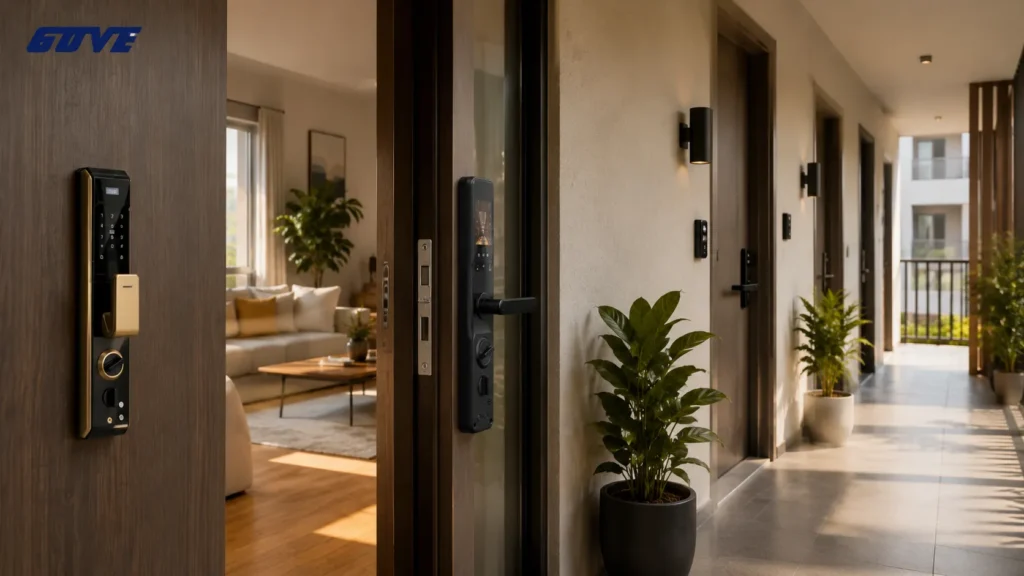
Every month you rely on physical keys, you’re paying a hidden tax in staff time, locksmith invoices, and lost-credential risk. A keyless entry system for apartments eliminates that overhead by replacing metal keys with digital credentials that can be issued, tracked, and revoked instantly.
Quick decision checklist: Before evaluating hardware, use these three questions to decide whether a keyless upgrade makes financial sense now.
- Do your staff spend more than 3 hours per week on lockouts, lost keys, or re-keying?
- Does each unit turnover cost you $75–$300 just in lock changes?
- Could you improve resident satisfaction and retention with seamless multifamily access control technology?
The Management Business Case: Why Transition to Digital Access?
A professional keyless entry system for apartments reduces operational overhead by eliminating key cutting, re-keying fees, and manual lockout responses. The real impact shows up in three areas that directly affect net operating income.
- Staff efficiency: Property managers we work with report recovering 5–12 hours per week when they no longer need to meet residents or vendors for physical key handoffs. That time shifts to lease renewals, maintenance planning, and resident communication.
- Asset value and rent premiums: Buildings with modern multifamily access control systems command higher perceived value. Smart, mobile-first access is now a top-three amenity for renters aged 25–44, and it often supports a 3–7% rental premium in competitive submarkets.
- Risk mitigation: Instant credential revocation eliminates the security gap that follows employee turnover or an eviction. Every former staff member, resident, or contractor can be removed from the system in seconds, with a complete audit trail to back it up.
Comparing Entry Methods: Fobs, PINs, and Mobile Access
No single credential type fits every apartment community. Most commercial deployments use a hybrid approach—mobile for residents, fobs for staff, and PIN pads as fallbacks. The table below breaks down the four most common methods to help you match hardware to your building profile.
| Credential Type | Hardware Cost per Door | Security Level | User Convenience | Management Ease |
|---|---|---|---|---|
| Mobile Credentials (BLE/NFC) | Medium-High | High (encrypted, phones rarely lost) | Very High | High (cloud-synced) |
| RFID Key Fobs/Cards | Low-Medium | Medium (lost fobs are a risk) | High | Medium (re-issuing needed) |
| Numeric PIN Keypads | Low | Low-Medium (codes can be shared) | Medium | Low (manual code changes) |
| Biometric (Fingerprint/Face) | High | Very High | Medium (enrollment friction) | Medium-High |
Table values assume commercial-grade hardware, not consumer smart locks. Always request third-party penetration test reports when biometric or mobile BLE encryption is a key decision factor.
Mobile Credentials: The Smartphone Advantage
Mobile access has moved from novelty to default in forward-looking apartment buildings. Residents unlock doors via a brand-specific app or a digital wallet, and credentials update over the air.
The biggest advantage for property teams is that no physical token exchange is required at move-in or move-out. The main objection—what happens when a phone dies—is handled by backup PIN pads on common entries and a process for issuing temporary codes to unit doors.
RFID Key Fobs and Cards: The Reliable Standard
Fobs remain popular in workforce housing and student communities where not every resident downloads an app. They’re inexpensive to replace and work reliably across parking gates, elevators, and amenity doors.
The downside is ongoing staff touch: lost fobs require deactivation and re-issuance, and a rogue unreturned fob can create a persistent security gap if the system isn’t audited weekly.
Numeric PIN Keypads: The Low-Maintenance Backup
PIN keypads are best deployed as secondary access points—pool gates, package rooms, or rear entries—rather than the primary resident door. They’re vulnerable to code sharing and wear patterns, so limit their use to areas where you need a low-cost, always-available fallback.
For unit doors, avoid standalone PIN-only locks; they generate more staff calls when residents forget or share codes.
Core Features of a Professional Apartment Access System
Any system you shortlist must be cloud-managed and support multi-point access across entry gates, common area doors, elevators, and individual units. Without these capabilities, you’ll end up managing multiple platforms and losing the operational efficiency that justified the upgrade.
Property Management Software Integration: Real-Time Sync Requirements
For portfolios over 50 units, sync with Yardi, Entrata, AppFolio, or ResMan isn’t optional. When a resident’s lease status updates in the PMS, their access credentials should adjust automatically—granting access at move-in, revoking it at move-out, or restricting it during a lease violation. Property management software integration can eliminate 80% of manual access administration. Always ask vendors to demonstrate real-time sync before you commit, and verify that both unit-level and common-area locks respond to PMS triggers.
Cloud-Based Management and Remote Control
A single dashboard should control all doors across your building portfolio. Cloud-based management lets regional managers issue visitor passes, deactivate lost fobs, or grant temporary maintenance access without stepping on site. Confirm that the platform includes role-based admin accounts and retains audit logs for at least 90 days. Off-site lockdowns, holiday schedule overrides, and time-bound contractor access must be executable from a mobile app or web console, especially during emergency maintenance when a plumber needs access at 2 a.m.
Audit Trails and Liability Protection
Every entry event—time, credential used, door location—should be logged and exportable. These logs reduce liability when residents claim unauthorized entry and satisfy many insurer risk-assessment requirements. In a dispute, you can produce a timestamped record showing exactly who accessed a unit and when. Choose a system that stores logs in a tamper-evident format and allows you to export reports for specific door groups or date ranges.
Visitor Management Beyond Intercoms
Integrated QR-code or digital pass systems let delivery drivers, dog walkers, and guests enter without a fob or phone call. The best solutions automatically generate one-time or recurring passes tied to specific unit numbers and expire them after use. This reduces package theft and eliminates the need for staff to buzz in visitors manually. Look for platforms that allow residents to send passes from their own app and set time windows, so you aren’t the bottleneck.
The Operational Math: Calculating ROI on Keyless Upgrades
Your payback period isn’t just about hardware cost divided by rent premium. It’s built on the recurring expenses that physical keys create and that disappear with digital access. Use the framework below to build your own analysis, and request pricing from hardware vendors to fill in each line.
Start by summing these annual costs under your current system:
- Re-keying per turnover: $85–$250 per unit, depending on lock type and locksmith rates. Multiply by expected annual turnovers.
- Staff lockout response: Track lockout incidents per month. Average cost = (staff hourly rate × time per call) × incidents per year. Many properties find this alone exceeds $3,000 annually for mid-sized buildings.
- Lost fob replacement and management time: If you issue 200 fobs and lose 15% a year at $5–$12 per fob plus 15 minutes of admin each, that’s another few hundred in hard costs and several staff hours.
- Potential insurance savings: Some carriers offer 5–10% premium reductions for properties with electronic access control and audit logs. Ask your broker for a conditional quote based on a fully digital system.
From our work with properties like yours, many 150-unit buildings see full ROI within 18–36 months, even before accounting for rent premiums. When you add the revenue lift from higher resident retention and faster leasing, the business case tightens further.
Implementation Strategies: Retrofitting vs. New Construction
Retrofitting: Phased Rollout and Power Options
Existing door frames, power availability, and resident disruption are your three biggest constraints. Battery-operated smart locks for unit doors avoid extensive wiring, but common area gates and main entries typically need PoE or wired power.
- Phasing is essential. Start with perimeter and amenity access, then move to individual units as leases turn over.
- Resident communication prevents adoption stalls. Provide a two-week notice window and on-site support staff during the transition.
- For doors without network cabling, specify locks that cache credentials locally and sync over a wireless hub, so daily entry never depends on a live internet connection.
New Construction: Wiring and Integration from Day One
Standardize door prep across all units, reducing hardware complexity. Run PoE/CAT6 to every lock location during rough-in and integrate elevator control immediately.
The incremental hardware cost is often lower than retrofitting, and the system is commissioned alongside the building’s network, avoiding later disruption. Spec scalable security solutions early to lock in these efficiencies.
Compliance, Security, and Liability Considerations
Overlooking code and liability requirements turns a technology upgrade into a legal risk. Verify these four areas before signing a purchase order.
ADA Compliance: Mounting and Interaction Requirements
All pedestrian entries must be accessible. Keyless touchscreens and readers need to be mounted within reach range (typically 15–48 inches above floor) and operate without tight grasping, twisting, or pinching. Voice-guided PIN pads or mobile BLE interaction often satisfy requirements more elegantly than older-style keypads. If your entryway uses a touchscreen, confirm it supports tactile buttons or an accessible mobile alternative.
Fire Code and Egress: Fail-Safe vs. Fail-Secure
Common area doors on egress routes must remain fail-safe—unlocking automatically during a fire alarm or power loss—or allow single-motion free egress. Confirm with your Authority Having Jurisdiction that your chosen electric locking hardware meets NFPA 101 or the local equivalent. Electromagnetic locks often require a dedicated fire alarm interface; electric strikes may need to be fail-secure on perimeter doors but fail-safe on exit-only doors.
Data Privacy and Resident Consent
Entry data belongs to the building, but you must disclose what’s collected and how long it’s retained. In some states, biometric data triggers specific consent requirements. Choose a vendor that encrypts data at rest and in transit, agrees to never mine resident entry patterns for secondary commercial use, and provides a Data Processing Agreement that spells out your rights as the controller. For properties with residents subject to GDPR or CCPA, you’ll also need tools for data subject access requests and deletion.
Cybersecurity Standards for Cloud-Connected Access
Cloud-connected locks must use AES-256 encryption for credential transmission and receive regular, signed firmware updates. Request a SOC 2 Type II report or equivalent third-party audit to confirm the vendor’s cloud infrastructure meets enterprise standards. Additionally, ask how the vendor handles mutual TLS for API connections and whether they operate a vulnerability disclosure program. Any lock that relies solely on BLE pairing without application-layer encryption introduces a vector you don’t want in a commercial building.
Selecting a Vendor: 5 Questions for Your Access Control Provider
Move past marketing claims by asking every shortlisted vendor these five questions. Their answers reveal whether they’re a true partner for a 10-year deployment or a hardware seller without infrastructure depth.
- “What happens if your cloud goes down?” A professional system must cache credentials locally at each lock or controller so residents can still enter during an internet outage. Ask for a live demo of failover behavior, not just a slide deck promise.
- “Can this manage 10 buildings as easily as one?” Multisite owners need a single pane of glass for all properties. If the vendor’s answer is “yes, but you need a separate instance per property,” reposition it as a scalability limitation.
- “Show me the line items beyond hardware.” One-time hardware costs are straightforward. Subscription SaaS fees per door per month, ongoing support charges, API access costs, and emergency service fees often aren’t disclosed in the first proposal. Insist on a total 5-year cost of ownership breakdown.
- “How do you handle resident onboarding at scale?” A rollout for 300 units isn’t the same as 30. Ask about bulk credential provisioning, resident training resources, and whether they assign a deployment specialist. Choosing smart locks for apartment buildings requires this operational lens, not just a spec sheet comparison.
- “What’s your product lifecycle and end-of-support policy?” Access hardware stays in walls for 10+ years. Know the minimum guaranteed firmware update window and the cost to upgrade if the product line ends.
| Vendor Type | Strengths | Watch For |
|---|---|---|
| Tier 1 Hardware Manufacturers (e.g., Gove) | Purpose-built hardware, deep R&D, long product lifecycles, direct engineering support | Integration depth with niche PMS platforms; confirm API flexibility |
| Software-First Platforms | Excellent cloud dashboards, frequent app updates, strong visitor management features | Reliance on third-party hardware compatibility; total cost of ownership may spike if you need multiple reader brands |
| Local Integrators / Locksmiths | Fast on-site support, familiar with local codes | May default to single-brand solutions regardless of fit; verify cloud management capability and long-term firmware support |
Request reference calls with properties of similar unit count and age. No table replaces a candid 15-minute call with a peer who already runs the system.
Designing Your Building’s Keyless Future
Selecting a keyless entry system for apartments isn’t a features-only decision—it’s an operational commitment that will define your property’s resident experience and staff workflow for the next decade. When owners prepare a door count by type (main entry, common areas, parking gates, elevators, unit doors) and list their existing PMS and network tools, suppliers can quote accurately rather than optimistically.
Next step: Request a custom system specification and demo consultation at Gove. Tell us your unit count and current access pain points, and we’ll map out a deployment strategy that fits your capital budget and timeline.
Frequently Asked Questions
What happens if the power or internet goes out?
Professional keyless systems are designed to function during outages. Wireless smart locks run on onboard batteries that last 1–2 years, and PoE-powered units often have battery backups. Credential data is cached locally, so residents can still unlock doors with existing mobile keys or PINs even if the cloud connection is interrupted.
Physical key overrides are also standard on unit locks for emergency access.
Can I use my existing locks, or do I need to replace everything?
For common area doors and gates, you typically install new electronic readers or intercoms connected to an access controller while keeping the existing door frame and core. Unit doors often require replacing the deadbolt or mortise lock with a compatible electronic lock. Some retrofit kits can work with standard door prep, but older, non-standard hardware may need full replacement. A site audit will give you the exact scope.
How does keyless entry affect apartment insurance?
Many carriers view electronic access control favorably because audit trails reduce liability claims around unauthorized entry. While automatic discounts aren’t universal, you can request a policy re-rating after installation. Document system features like certificate-based mobile credentials, encrypted data, and real-time audit logs to present to your underwriter.
Is there a monthly subscription fee for the software?
Yes, most enterprise cloud-based keyless platforms operate on a Software-as-a-Service (SaaS) model. Fees typically range from $2–$8 per door per month and cover credential management, cloud storage of audit logs, firmware updates, and API access for PMS integration. Always ask for a total 5-year cost comparison that bundles hardware, installation, and software fees to avoid surprise line items in year two.



