
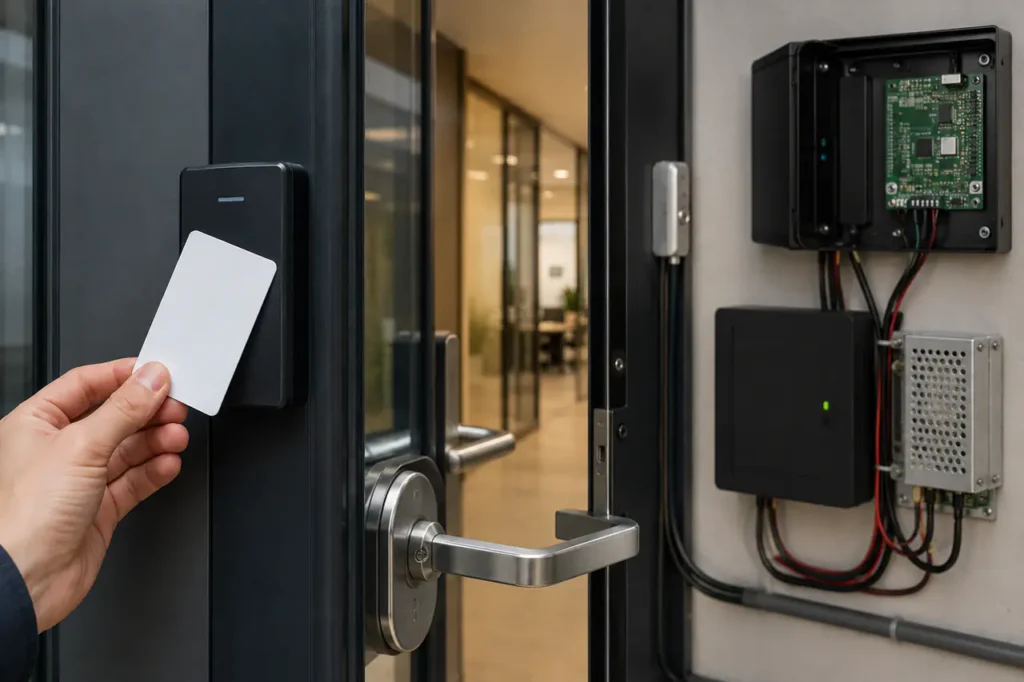
Upgrading commercial facility access control often comes down to balancing security, door traffic, and operational management. Transitioning to a modern card reader door lock system eliminates mechanical key management while providing clear audit trails for commercial properties.
Integrating wall readers, controllers, power supplies, and door locks requires technical clarity before requesting quotes. Choosing hardware that matches your door frames and network infrastructure prevents costly retrofits during installation.
Core Components of a Commercial Access Control System
A complete electronic access system relies on four primary hardware components working together to authenticate users and release locks. Skimping on any single component compromises total system security.
Credentials and Card Encoding
User credentials range from simple RFID cards to encrypted smart cards and key fobs. The card stores unique access data that communicates wirelessly with the door reader during entry.
Proximity and Smart Card Readers
Installed on the unsecure side of the door, the Key Card Door Access System reader captures credential data and passes it to the central controller using standard communication protocols like Wiegand or OSDP.
Access Control Controller Panels
The controller acts as the brain of the facility. Mounted in a secure electrical closet, it verifies permissions against its database and sends signal voltage to unlock the door.
Electric Door Locking Mechanisms
Physical locks enforce physical security. Powered magnetic locks or electric strikes receive signal power from the controller panel to release the mechanical latch during authorized access.
Before issuing requests for proposals, verify these basic hardware matching rules:
- Credential operating frequency matches reader receiver specifications (125 kHz vs 13.56 MHz).
- Reader housing rating suits installation environment (IP65 weatherproofing for exterior posts).
- Controller board terminal capacity accommodates planned total hardware door drops.
- Lock power draw matches system power supply amperages and backup battery capacity.
Comparing Key Card Technologies: Which Credential is Best?
Selecting card credentials determines your physical security baseline. Legacy magnetic stripe cards carry high cloning risks, while encrypted smart cards offer multi-layered security for sensitive commercial areas.
Credential Technology Comparison
| Technology | Security Level | Reading Range | Typical Commercial Use Cases |
|---|---|---|---|
| Magnetic Stripe | Low | Contact / Swipe | Legacy hospitality, basic fitness center membership cards |
| Proximity (125 kHz RFID) | Low – Medium | 2 – 4 inches | Standard commercial office doors, interior facility access, parking gates |
| Smart Cards (13.56 MHz NFC) | High (Encrypted) | 1 – 2 inches | High-security enterprise offices, research labs, healthcare facilities |
| Dual-Tech / Hybrid Cards | High | Varies | Facilities transitioning from legacy proximity readers to cloud mobile access |
While standard proximity cards offer low initial credential costs, facilities handling proprietary data or valuable physical inventory should mandate encrypted smart cards to block badge duplication tools.
Why Proximity RFID Is Shifting to Encrypted Smart Cards
Unencrypted 125 kHz proximity cards transmit facility codes in clear text, making them vulnerable to handheld card cloners. High-frequency 13.56 MHz smart cards use AES encryption to secure communication between credential and reader.
Where Legacy Magstripe Cards Fail
Magnetic stripe cards suffer from physical wear and magnetic field corruption. Replacing worn badges increases ongoing spending, making proximity or smart card hardware far more economical over time.
Many hospitality properties choose dedicated solutions like a Hotel Key Card Lock System designed specifically for heavy guest rotation.
Choosing Your Architecture: Standalone vs. Cloud-Managed Systems
Architecture dictates how door permissions are updated. Standalone kits manage credentials directly at each door, while cloud systems provide instant remote permission management across multiple facilities.
Standalone vs. Networked Systems
| Factor | Standalone Access Control | Cloud-Managed System |
|---|---|---|
| Deployment Ease | Fast, minimal wiring, no IT network setup required | Requires network drops, IP configuration, power-over-ethernet setup |
| Upfront Cost | Low initial equipment investment | Moderate to high initial hardware and controller costs |
| Ongoing Licensing | Zero recurring software subscription fees | Monthly or annual per-door SaaS subscription fees |
| Scalability | Difficult to manage beyond 1-3 local doors | Infinite door expansion across multi-site properties |
| User Admin | Manual credential programming at each door reader | Centralized cloud dashboard with instant remote card revocation |
Selecting between offline and online architecture fundamentally impacts daily administrative workload and long-term operating costs.
When Standalone Single-Door Kits Make Sense
Standalone systems excel in remote utility buildings, isolated supply closets, or single-door applications where credential changes happen infrequently and running network wiring is cost-prohibitive.
Why Multi-Site Facilities Need Cloud Management
Multi-tenant office buildings, enterprise campuses, and commercial properties require central management. A cloud Door Access Control System lets property managers revoke lost badges instantly across all doors from a web browser or mobile app.
Commercial managers evaluating residential or mixed-use properties often compare dedicated Apartment Access Control System setups to streamline tenant turnover.
Selecting the Right Physical Hardware: Maglocks vs. Electric Strikes
The choice between electromagnetic locks and electric strikes depends on door frame materials, exit requirements, and local fire codes. Mismatching physical lock hardware stalls building inspections and compromises life safety.
Electromagnetic Locks (Maglocks)
Maglocks mount on the door frame header and use electromagnetic force (typically 600 lbs to 1200 lbs holding strength) to keep doors secured. They feature no moving mechanical parts, ensuring high durability in high-traffic commercial entryways.
Because maglocks rely on active power to maintain lock engagement, they are inherently fail-safe. Cutting power releases the magnetic seal, allowing free egress during emergency power drops or fire alarm triggers.
Electric Strikes
Electric strikes replace the standard frame strike plate, working alongside existing mechanical locksets or panic bars. When energized, the strike lip pivots, allowing the latch bolt to pass without turning the mechanical lever handle.
Electric strikes can be configured on-site for fail-safe or fail-secure operation. Fail-secure strikes remain locked during power outages, preserving perimeter security for exterior building entrances.
Matching Frame Prep to Holding Strength Requirements
Heavy steel doors subject to forced entry risks require 1200 lb maglocks or grade 1 electric strikes. Aluminum storefront doors or glass partitions usually require specialized mounting brackets or slimline strike cutouts.
For interior office doors needing high-tier security with direct keypad or biometric backups, commercial all-in-one smart handle locks like the Gove D 7800 Smart Door Lock eliminate external controller cabling altogether.
Key Benefits and Operational Challenges
Moving from physical keying to electronic access control modernizes facility security administration. However, facility managers must plan for backup power and credential issuance protocols to avoid operational bottlenecks.
Core Operational Advantages
- Eliminates rekeying expenses when staff leave or lose physical key sets.
- Provides timestamped audit logs for security compliance and incident review.
- Enables automated door locking schedules based on facility business hours.
- Allows customizable user access groups categorized by department, role, or shift time.
Facility Vulnerabilities and Edge Cases
- Lost or shared badges create unauthorized entry risks if credential revocation is delayed.
- Extended utility power outages require backup battery power supplies to maintain access.
- Physical tailgating remains a risk unless integrated with door sensor alarms or video surveillance.
What to Verify Before Retiring Mechanical Keys
Retaining mechanical key overrides on exterior doors provides vital emergency fallback during catastrophic system component failure. Always verify that physical lock cylinders are keyed to a secure master key system stored off-site.
Cost Factors and Procurement Considerations
Total procurement expenses extend beyond initial hardware purchases. Sourcing teams must evaluate wiring installation labor, controller commissioning fees, and ongoing software licensing when evaluating vendor proposals.
Physical Door Hardware and Reader Variables
Hardware pricing scales with security capabilities and environmental ratings. Heavy-duty IP65 vandal-resistant readers cost more up front but prevent water damage failure on exterior parking gates and warehouse docks.
Cabling, Wiring, and Labor Complexity
Pulling low-voltage composite wire from central controller panels to each door frame represents a major portion of installation labor. High-rise retrofits lacking existing wire pathways increase overall labor hours significantly.
SaaS Licensing and Recurring Maintenance Costs
Cloud access management software platforms bill recurring subscription fees calculated per door or per active cardholder. Factor these annual operating expenses into your 5-year total total cost of ownership model before selecting software vendors.
Hidden Quote Risks to Watch
When comparing vendor estimates, scrutinize proposals for unquoted hardware dependencies:
- Unquoted frame prep charges for cutting stainless steel jambs or glass headers.
- Omission of required battery backup enclosures and power distribution modules.
- Proprietary card encoding lock-in that prevents purchasing replacement credentials from third parties.
- Exclusion of fire alarm relay integration necessary for emergency door release compliance.
Next Steps for System Design and Installation
Designing an efficient electronic access layout starts with gathering precise door specs, frame materials, and user capacity targets. Preparing these details before consulting suppliers speeds up proposal accuracy and eliminates costly change orders.
Spec Preparation Checklist Before Requesting Quotes
- Total door opening count categorized by interior office vs. exterior perimeter doors.
- Door leaf and frame materials (hollow metal, aluminum storefront, wood, frameless glass).
- Preferred user credential types (RFID proximity cards, encrypted smart cards, mobile NFC).
- Network infrastructure preferences (standalone local controllers vs. multi-site cloud platform).
- Fire code emergency egress requirements (fail-safe power drops tied to building alarm panels).
Coordinating Site Audits with Security Integrators
Request an on-site hardware audit before finalizing supply contracts. Experienced security integrators verify door swing clearances, latch dimensions, and power drop locations to ensure that selected card reader door lock hardware fits your building layout smoothly.
Frequently Asked Questions
What happens to a card reader system during a power outage?
Access control systems rely on backup batteries inside power supply enclosures during outages. Fail-safe locks unlock automatically for emergency egress, while fail-secure locks remain secured, operating via mechanical key override or auxiliary battery reserves.
Can standalone access control systems be expanded later?
True standalone door reader kits operate independently without network connections. If future expansion across multiple doors is expected, installing a networked or cloud-ready access controller initially avoids tearing out unmanaged standalone hardware later.
How do you program a standalone key card reader?
Standalone readers are programmed directly at the door using a master keypad code or dedicated programming cards. Administrative personnel add or delete user card positions through simple keypad command sequences without requiring computer software.



