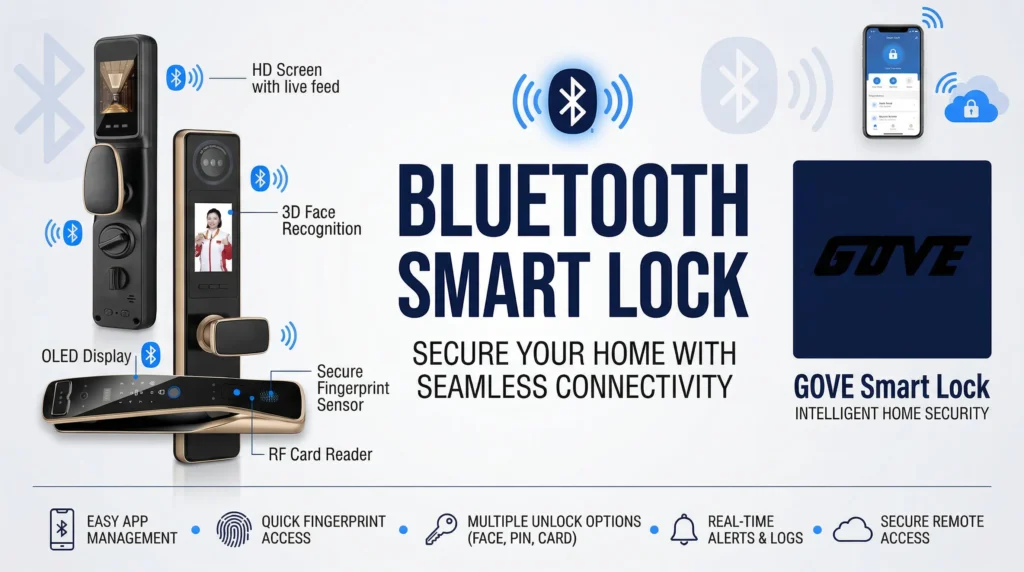
What Is a Bluetooth Smart Lock and How Does It Actually Work?
Are you tired of fumbling for physical keys in the dark or worrying about what happens to your home security when the Wi-Fi goes down? As a smart lock manufacturer, we hear these everyday concerns constantly. The simplest, most reliable solution to upgrade your home entry is a bluetooth smart lock.
The Power of Bluetooth Low Energy (BLE)
At its core, a keyless bluetooth smart lock relies on Bluetooth Low Energy (BLE) technology. Unlike older wireless tech that constantly drains your battery, BLE is designed specifically to transmit small amounts of data over short distances using incredibly low power. This means your lock communicates directly with your smartphone. It does not need an internet connection, a central smart hub, or constant battery changes to keep your home secure.
How a Bluetooth Enabled Smart Lock Works
Using a bluetooth door lock is designed to be completely frictionless. Here is exactly what happens between your phone and your door:
- Secure Pairing: When you first install the device, your phone and the lock establish an encrypted, one-to-one \”handshake\” that keeps hackers out.
- Proximity Detection: As you walk up to your house, the lock continuously scans for your phone\’s unique BLE signal, detecting it once you are within range (usually 30 to 50 feet).
- Hands-Free Auto-Unlock: For ultimate everyday convenience, a proximity unlock smart lock recognizes when you are right at the door and automatically triggers the deadbolt to retract. You never have to put your groceries down.
- Manual App Control: If you prefer total manual control, you can simply open your bluetooth smart lock app and tap a button on your screen to lock or unlock the door instantly.
Bluetooth vs WiFi Smart Lock Models
If you are trying to decide between a standalone bluetooth smart lock and a hybrid model, understanding their core differences is critical for your home setup. Here is a clear breakdown:
| Feature | Bluetooth-Only Smart Lock | Bluetooth + Wi-Fi Hybrid Model |
|---|---|---|
| Connection Type | Phone-to-lock directly | Connects through a home router |
| Internet Required | No (works completely offline) | Yes (requires constant Wi-Fi) |
| Battery Life | Excellent (often 6–12 months) | Moderate (Wi-Fi drains power faster) |
| Remote Access | Limited to Bluetooth range (30-50 ft) | Anywhere in the world via cloud |
| Security Focus | Localized, localized data storage | Cloud-dependent, remote servers |
| Best Used For | Everyday home use, offline reliability | Vacation rentals, remote monitoring |
Key Advantages of a Bluetooth Smart Lock
When engineering a bluetooth smart lock, our main focus is on practical, everyday reliability. Here is why choosing a bluetooth enabled smart lock is often the smartest move for your home security:
- Exceptional Battery Life: Without the constant energy drain of searching for a Wi-Fi signal, the battery life on a bluetooth door lock is incredibly efficient. You can typically expect a solid 6 to 12 months of use before needing a replacement.
- Zero Internet Dependency: You do not need a smart hub or an active internet connection. A no wifi smart lock keeps your home secure and fully functional even during local power outages or router failures.
- Hands-Free Convenience: Using a proximity unlock smart lock, the system detects your smartphone as you approach and unlocks the door automatically. Plus, sending secure, temporary access to guests takes just seconds.
- Simple Setup and Lower Costs: Bluetooth models are generally more affordable and easier to install than full Wi-Fi systems. They also offer flexible hardware backups; for example, you can easily rekey a smart lock if you ever need to change physical access without replacing the entire unit.
- Maximum Privacy: Because your data, access codes, and entry logs remain stored locally on the device rather than on a vulnerable cloud server, a home smart lock bluetooth system guarantees your family\’s routine stays completely private.
Limitations and When a Bluetooth Smart Lock is the Smarter Choice
Every technology has its boundaries. For a bluetooth smart lock, the main limitation is distance. Because it relies on proximity, the signal range typically caps out around 30 to 50 feet. Since it functions as a no wifi smart lock, you won\’t get true remote access. You simply cannot unlock your front door from across the country.
While you might need a different solution for remote perimeter access—like a specialized outdoor gate smart lock—this limited range is exactly what makes Bluetooth so secure for your main entry. The restriction is a built-in safety net that keeps your data local.
Bluetooth vs Wi-Fi Smart Lock
Here is an honest look at how a bluetooth door lock stacks up against a cloud-connected Wi-Fi model:
| Feature | Bluetooth Smart Lock | Wi-Fi Smart Lock |
|---|---|---|
| Security | High (Local, offline encryption) | Moderate (Cloud-dependent, potential hacking risks) |
| Convenience | Fast proximity auto-unlock | True remote access from anywhere |
| Power Use | Extremely low (Batteries last 6–12 months) | High (Requires frequent battery swaps) |
| Setup | Fast and simple (Phone-to-lock pairing) | More complex (Requires router or hub syncing) |
Who Should Choose a Bluetooth Enabled Smart Lock?
Deciding between a bluetooth vs wifi smart lock comes down to your daily routine. We recommend a Bluetooth system for specific, everyday scenarios:
- Privacy-Focused Users: Your access data stays entirely on your phone and the lock itself, avoiding vulnerable cloud servers.
- Apartment Renters: You get secure, keyless entry without needing to configure complex internet network connections.
- Single-Family Homes: Perfect if you just want easy, hands-free unlocking when you walk up to the door and don\’t require managing guest access while you are out of town.
Essential Features to Evaluate Before You Buy
When investing in a bluetooth smart lock, you need reliable hardware that seamlessly fits your daily routine. Here are the core features we recommend checking before making a decision.
Security and Grading
A secure bluetooth door lock starts with physical strength. Always check for ANSI/BHMA grading (Grade 1 or 2 is best for residential doors). On the software side, industry-standard AES encryption and built-in tamper alerts are non-negotiable to protect your data and deter intruders.
Flexible Access Methods
You want a keyless experience, but having multiple entry options matters. Look for models offering:
- Bluetooth smart lock app control for fast, everyday unlocking.
- Pin-code keypads for easy guest access.
- Biometric scanners (a fingerprint bluetooth smart lock provides the fastest entry).
- A hidden physical keyway for emergency backup.
Smart-Home Compatibility
Even as a standalone device, your home smart lock bluetooth model might need to scale in the future. Verify if the lock supports optional bridging to smart home ecosystems like Alexa, Google Home, or Apple HomeKit.
Build Quality and Weatherproofing
Exterior hardware faces harsh elements. Demand high IP weather ratings (like IP65) to withstand heavy rain, dust, and freezing temperatures. Additionally, the lock must fit your specific door frame perfectly. Upgrading specialized doors requires exact matching hardware, such as installing a precise smart lock for mortise lock configuration to ensure maximum security and a flush, durable fit.
Core App Functionality
The companion app dictates your daily user experience. It must be fast, stable, and easy to navigate.
| Must-Have App Feature | Why You Need It |
|---|---|
| Activity Logs | Track exactly who unlocks the door and at what time. |
| Temporary Codes | Generate time-sensitive access for guests, cleaners, or contractors. |
| Auto-Lock Timers | Automatically secure the door after a set time so you never leave it exposed. |
Install Bluetooth Deadbolt: A Step-by-Step Guide
As a home smart lock manufacturer and supplier, we know that the thought of changing out door hardware can seem intimidating. However, upgrading to a bluetooth smart lock is incredibly straightforward. You do not need to be a contractor to get this done; our locks are engineered for a quick, 15-minute DIY installation.
Tools Needed and the 15-Minute DIY Process
For most standard doors, the only tool you need is a standard Phillips-head screwdriver. Leave the power drill in the toolbox.
- Remove the old hardware: Simply unscrew your existing deadbolt and slide it out of the door.
- Install the new latch: Slide the new latch into the edge of the door and secure the strike plate on the door frame.
- Mount the exterior and interior: Place the exterior lock face on the outside, feed the connection cable underneath the latch, and plug it into the interior mounting plate.
- Secure and power up: Screw the interior assembly into place and insert the batteries.
If you are outfitting a standard entry door, upgrading is seamless. Products like our Gove A7818 Smart Door Lock are specifically designed to drop right into existing standard door cutouts with zero hassle.
When to Call a Professional Locksmith
While a bluetooth enabled smart lock is easy to install, your physical door must be in good shape. We recommend calling a professional locksmith if:
- Your door is visibly warped, damaged, or sagging on its hinges.
- The latch and strike plate do not align perfectly (e.g., you have to push, pull, or lift the door hard to lock it manually).
- You are trying to retrofit a complex mortise lock setup instead of a standard deadbolt.
A motorized home smart lock bluetooth system needs a smooth, frictionless path to extend the deadbolt. If the door is misaligned, the motor will jam, which will cause your smart lock to fail and drain your battery life rapidly.
Post-Installation Checklist
Once the lock is physically mounted on the door, complete these final steps to get your system fully operational:
- Pairing: Open your dedicated bluetooth smart lock app, ensure your smartphone\’s Bluetooth is turned on, and follow the simple on-screen prompts to pair the device securely.
- Testing: First, test the lock manually using the interior thumb turn to ensure there is no physical friction. Next, test the electronic functions by using the app to lock and unlock the door.
- Firmware Updates: Immediately navigate to the device settings in your app and check for firmware updates. Running the latest software ensures you have the most up-to-date security patches and optimal battery efficiency.
Bluetooth Smart Lock Security: Myths Debunked
Let\’s clear the air. Many people worry that a bluetooth smart lock is easy to hack. In reality, a well-built secure bluetooth door lock is incredibly tough to bypass. Here is the truth behind common security fears.
Real Encryption Standards
- Bank-Level Protection: Modern Bluetooth locks use AES 128-bit encryption. Your digital keys are heavily scrambled, making them virtually impossible for hackers to steal.
- Local Data Storage: Because it does not rely on Wi-Fi, your lock\’s data stays between your phone and the device. There is no vulnerable cloud server for hackers to breach.
Stopping Relay Attacks
A relay attack happens when someone tries to amplify your phone\’s signal from outside to open your door. We block this from happening:
- Precise Proximity: The lock\’s sensors only trigger when your authorized device is physically within a few feet of the door.
- Total App Control: You can instantly adjust settings in your bluetooth smart lock app, including disabling the auto-unlock feature so the door only opens when you manually approve it.
Proven Hardware Reliability
Digital security means nothing if the physical hardware is weak. We build our locks to survive heavy daily use, extreme weather, and physical tampering. For example, the Gove S23-1 door lock features a reinforced casing and anti-drill cylinder. Extensive user testing proves that a modern bluetooth enabled smart lock delivers heavy-duty, real-world protection you can actually trust.
Gove Bluetooth Smart Locks: Engineered for Reliability
At Gove, we design every bluetooth smart lock specifically for everyday home use. Our mission is to provide a seamless, secure, and keyless entry experience that you can rely on day in and day out. Whether you need a heavy-duty smart deadbolt bluetooth model or an elegant lever lock, our products are built strictly for simplicity, robust security, and practical convenience.
Core Features of Our Keyless Bluetooth Smart Lock
We focus heavily on the essentials that make your daily routine easier:
- Massive Battery Life: Forget about constantly swapping out dead AA batteries. Models like the highly efficient Gove A8010 Smart Door Lock are optimized for extremely low power consumption, maximizing your battery life bluetooth door lock performance for up to a full year.
- Seamless Proximity Unlock: Walk right up to your door and step inside. Our proximity unlock smart lock technology pairs instantly with your smartphone for contactless entry.
- Multiple Quick Access Options: From highly responsive, anti-peep keypads to high-speed fingerprint bluetooth smart lock scanners, you choose exactly how you want to get inside.
- Intuitive App Control: Manage users, track entry logs, and generate temporary access codes effortlessly using our streamlined bluetooth smart lock app.
How We Solve Common Smart Lock Pain Points
We actively listened to the biggest frustrations people have with connected home security and engineered our locks to eliminate them entirely.
| Common Frustration | The Gove Solution |
|---|---|
| Wi-Fi and Power Outages | Every bluetooth enabled smart lock we make works 100% locally. You are never locked out when your home internet goes down. |
| Complicated Installation | We prioritize quick, DIY-friendly setups. Upgrading your door takes just minutes, as seen with the sleek Gove G-17C Smart Door Lock. |
| Constant Battery Drain | By leveraging advanced BLE (Bluetooth Low Energy) technology, we drastically cut down the power drain that plagues standard Wi-Fi locks. |
| Data Privacy Risks | Your access codes, fingerprints, and entry logs stay stored locally on the lock and your phone, bypassing vulnerable cloud servers. |
Real-World Applications for a Bluetooth Smart Lock
A reliable bluetooth smart lock fits naturally into almost any lifestyle. We design our locks to solve everyday problems without adding complicated tech to your routine. Here is exactly how different users get the most out of our systems:
- Busy Families: Forget about making spare keys for the kids. With an auto unlock bluetooth lock, the door opens automatically as they walk up with their recognized smartphones. It is fast, secure, and completely hands-free when carrying groceries.
- Renters and Landlords: Installation is quick and usually just requires a standard screwdriver. You get all the benefits of a keyless bluetooth smart lock without permanently modifying the door or running complex wiring.
- Airbnb Hosts: Managing guests is much easier when you don\’t have to meet them in person for key handoffs. You can easily issue temporary access codes that expire right after checkout. Explore our full range of smart lock products to find the perfect deadbolt or lever for your rental property.
- Elderly Users: Fumbling with tiny physical keys is frustrating, especially in the dark. Proximity unlocking and large, responsive keypads make coming home entirely stress-free.
Daily Routines and Smart Automations
Integrating a bluetooth door lock into your daily routine keeps your home secure without extra effort. You can easily set your lock to automatically secure itself 30 seconds after the door closes—giving you total peace of mind when rushing out to work.
You also maintain full control over these automations. If you are hosting a backyard barbecue and want to keep the door open, you can quickly adjust your app settings or learn how to turn off your smart lock auto-locking features temporarily. Whether you want seamless automation or simple push-button access, bluetooth technology keeps your home access local, fast, and entirely on your terms.
Frequently Asked Questions
How long does the battery last on a bluetooth smart lock?
Most of our bluetooth door locks run on standard AA batteries that last between 6 to 12 months. You don\’t have to guess when they will run out—the app will send you low-battery notifications weeks before they actually die.
What happens if my phone dies? Am I locked out?
Not at all. A reliable keyless bluetooth smart lock always comes with backup entry methods. You can easily use the built-in keypad, a traditional backup key, or a registered fingerprint, depending on the specific model you choose.
Why won\’t my phone connect to my lock?
Bluetooth range is typically around 30 to 50 feet. If your phone isn\’t connecting, step closer to the door, verify that your phone\’s Bluetooth setting is turned on, and ensure the lock\’s batteries aren\’t completely drained.
Can I upgrade my bluetooth enabled smart lock to Wi-Fi later?
Yes. Many of our models support optional plug-in Wi-Fi bridges. You can add a bridge to a nearby wall outlet later to unlock full remote access and smart home voice controls without replacing the whole lock.
Will a smart deadbolt bluetooth model fit my existing door?
Yes, our locks are engineered to fit standard door preparations. Installation usually takes about 15 minutes using just a Phillips screwdriver, making it a simple DIY project.
Is a no wifi smart lock more secure?
Because a local bluetooth smart lock doesn\’t connect directly to the cloud, it is inherently protected from remote internet hacking attempts. Your access data stays encrypted locally between the lock hardware and your phone.
How reliable is the auto unlock bluetooth lock feature?
Highly reliable. The system uses your phone’s location to detect when you arrive home. Once you step within a few feet of the door, the proximity unlock smart lock recognizes your secure Bluetooth signal and automatically throws the deadbolt so you can walk right in.
What is your warranty policy and how do I get help?
We stand behind the durability of our hardware. All our locks come with a standard manufacturer\’s warranty covering electronic and mechanical parts. If you ever experience range issues, setup trouble, or just need warranty service, please contact our support team directly for fast, professional assistance.