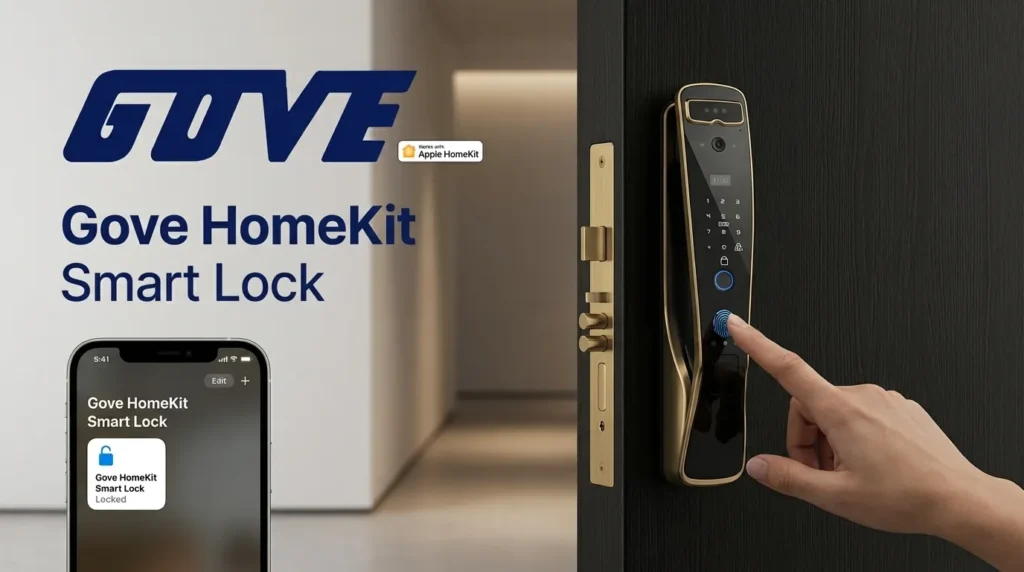
Are you worried about unauthorized access to your front door? Wondering if a basic Wi-Fi lock truly protects your family from digital threats? When it comes to securing your home, standard connectivity often leaves dangerous vulnerabilities. Upgrading to a dedicated Apple ecosystem solution eliminates those blind spots.
What Exactly is a HomeKit-Compatible Smart Lock?
A homekit smart lock is a highly secure electronic deadbolt engineered to communicate directly with the Apple Home ecosystem. As a leading smart door lock manufacturer, we design these devices to bypass vulnerable third-party clouds and connect straight to your iOS devices. This means your Apple Home smart lock operates natively within your iPhone, iPad, or Apple Watch, providing a seamless, unified smart home experience.
HomeKit Framework vs. Standard Wi-Fi Locks
Understanding the difference between Apple\’s framework and standard Wi-Fi connectivity is crucial for your home security.
- Standard Wi-Fi Locks: Rely heavily on third-party cloud servers. If the manufacturer\’s server goes down or your internet drops, you lose remote access. They also carry a higher risk of remote hacking.
- HomeKit Framework: Processes commands locally through your home hub (like an Apple TV or HomePod). This local processing guarantees instant response times and keeps your data entirely within your own network.
The Apple Standard: MFi Certification and Security
We manufacture every secure smart lock for iPhone to meet Apple’s rigorous security benchmarks. Building a product for this ecosystem requires passing strict hardware and software testing.
- MFi Certification: Standing for \”Made for iPhone/iPad,\” this certification proves the lock hardware meets Apple\’s exacting performance and quality control standards.
- End-to-End Encryption: All communication between your device and the lock is encrypted. Not even Apple—or us as the manufacturer—can intercept your digital keys.
- Hardware Authentication: Built-in cryptographic co-processors ensure that only authorized devices can trigger the unlocking mechanism.
By adhering to these elite manufacturing standards, we deliver a product that guarantees your front door remains impenetrable to digital threats while offering flawless daily operation.
Why Integrate Your Front Door with Apple Home?
Upgrading to a homekit smart lock fundamentally transforms how you interact with your home. As a dedicated manufacturer, we build these locks to fit perfectly into your daily routine, offering a level of convenience and protection that standard Wi-Fi locks simply cannot match. If you are building the ultimate smart home, here is why a smart lock homekit integration is the right move.
Unmatched Privacy and Security
Apple sets the gold standard for data protection. Every homekit compatible smart lock utilizes end-to-end encryption and local processing. This means your access data and digital keys stay securely on your devices, rather than sitting on a vulnerable third-party cloud server. It is the foundation of a truly secure smart lock for iPhone users.
Seamless Voice Control
When your hands are full with groceries or luggage, a Siri compatible door lock makes life incredibly easy. Just say, \”Hey Siri, unlock the front door,\” via your phone or smart speaker. This hands-free operation provides instant access without ever needing to drop what you are carrying.
Advanced Automations
You can easily automate door lock Apple Home routines to fit your exact lifestyle. By creating custom Scenes in the Apple Home app, your house reacts automatically to your schedule.
- \”Good Night\” Scene: Automatically secures the deadbolt, lowers the thermostat, and turns off the lights with a single tap.
- \”Leaving Home\” Scene: Locks all entryways the moment your phone detects you have left the property.
Remote Access & Guest Management
When paired with an Apple TV or HomePod acting as a home hub, an Apple Home app door lock gives you total control from anywhere in the world. You can instantly grant remote access to dog walkers, family members, or contractors, and check your lock\’s status in real-time.
Apple Wallet Integration
The absolute peak of keyless entry HomeKit technology is the Apple Home Key. Simply tap your phone or use your Apple Watch smart lock integration to unlock the door instantly via Apple Wallet. It works exactly like tapping to pay at a store—fast, secure, and effortless.
Whether you are securing your primary front door or expanding your ecosystem to the backyard with a reliable sliding door smart lock, integrating your access points with Apple Home ensures a flawless, unified experience across your entire property.
Crucial Features to Look for Before You Buy a HomeKit Smart Lock
Finding the perfect homekit compatible smart lock means looking beyond basic app control. As a leading smart door lock manufacturer, we always advise our global customers to evaluate a few core hardware and software features before upgrading their front door.
Connectivity: Bluetooth, Wi-Fi, Thread, and Matter
How your lock communicates with your network dictates its speed, reliability, and power consumption.
- Bluetooth: The standard baseline. It provides a reliable close-range connection but requires a hub for remote access.
- Wi-Fi: Connects directly to your home router. This often serves as a HomeKit smart lock no hub required solution, though it consumes battery power much faster.
- Thread: The current gold standard for the smart home. A Thread smart lock HomeKit setup delivers lightning-fast response times, creates a mesh network for better range, and barely sips battery power.
- Matter Compatibility: Investing in Matter compatible smart locks ensures your hardware is future-proofed, allowing it to communicate seamlessly across the entire Apple ecosystem and beyond.
| Connectivity Protocol | Response Speed | Battery Drain | Best Use Case |
|---|---|---|---|
| Bluetooth | Average | Low | Basic local control |
| Wi-Fi | Fast | High | Direct remote access |
| Thread | Instant | Very Low | Advanced, fast smart homes |
Multiple Entry Methods
While using your iPhone or Apple Watch smart lock integration is highly convenient, relying on a single entry method is a security risk. The best smart lock for Apple ecosystem setups will offer robust backup options. We highly recommend choosing a HomeKit door lock with keypad access, a highly responsive biometric fingerprint scanner, and a concealed physical keyhole.
Battery Life and Power Management
Consistent power management keeps your home secure. Direct Wi-Fi locks generally require battery replacements every 3 to 4 months. In contrast, locks utilizing Thread or Bluetooth can easily last 6 to 12 months. Always verify that your Apple Home app door lock supports low-battery push notifications so you are never caught off guard.
Retrofit vs. Full Deadbolt Replacement
Selecting the right physical design depends on your door and living situation.
- Retrofit Locks: These attach only to the interior thumb-turn of your door. You keep your existing exterior hardware and physical keys. This is the ideal solution for renters or those who want a discreet smart upgrade.
- Full Replacement: This involves removing your old hardware entirely. A complete HomeKit deadbolt replacement provides a much sleeker aesthetic and typically houses built-in keypads and scanners. If you opt for a full hardware swap, you can easily rekey your smart lock to match the existing physical keys used on your other exterior doors.
How to Set Up Your HomeKit Smart Lock
Getting your new homekit smart lock up and running is a straightforward process. We engineer our smart locks to ensure that both the physical installation and the digital pairing take only minutes, requiring no specialized tools or professional help.
Physical Installation Best Practices
A proper physical setup guarantees smooth operation and prevents jamming. Whether you are doing a full HomeKit deadbolt replacement or a simple retrofit, follow these core steps:
- Remove the old hardware: Take out your existing deadbolt and clear away any debris from the door hole.
- Align the new latch: Ensure the latch bolt moves smoothly in and out of the door frame without friction.
- Secure the hardware: Mount the exterior keypad and interior assembly. For instance, installing the Gove A7818 Smart Door Lock takes just a standard Phillips screwdriver and aligns perfectly with standard door preparations.
- Power it up: Insert the batteries only after the lock is fully assembled and the door is in the open position to allow for automatic calibration.
Scanning the HomeKit QR Code
Once the physical lock is mounted, it is time to connect it to your ecosystem. The Apple Home app door lock integration is built for total simplicity:
- Locate the code: Find the unique HomeKit setup QR code. We typically place this on the interior battery cover or right on the quick start guide.
- Open the app: Launch the Apple Home app on your iPhone or iPad.
- Add accessory: Tap the \”+\” icon in the top right corner and select \”Add Accessory.\”
- Scan and pair: Use your camera to scan the QR code. The Apple Home app will automatically detect, authenticate, and pair your lock securely.
Assigning Rooms and Basic Automations
The final step is customizing how your lock behaves within your Apple ecosystem.
- Name your lock: Give it a clear, recognizable name like \”Front Door\” or \”Side Entry\” to ensure flawless Siri voice commands.
- Assign a room: Group the lock into a specific room to keep your Apple Home dashboard organized and easy to navigate.
- Automate door lock Apple Home: Set up basic routines, such as automatically locking the door every night at 10 PM or unlocking it when your iPhone detects you arriving home. If you ever need to temporarily disable these routine functions for a party or event, knowing how to turn off your smart lock auto-lock settings gives you complete manual control over your home\’s accessibility.
The Gove Advantage: Why Manufacturing Excellence Matters
As a leading HomeKit smart lock supplier, we know that building a reliable Apple Home smart lock requires more than just basic hardware. It demands precision engineering and total control over the production line. At Gove, we build our products from the ground up to ensure every lock meets strict security standards.
Direct from the Source
We operate as a direct smart door lock manufacturer, which gives us complete oversight of the entire process.
- Strict Quality Control: Every component is tested on our assembly line before it reaches your door.
- In-House Firmware: We manage our own software updates. This guarantees your homekit smart lock stays secure against emerging threats without waiting on third-party developers.
- Premium Hardware: When you install models like the Gove S23-1 Door Lock, you are getting heavy-duty materials designed to withstand harsh weather and daily wear.
R&D and Innovation
The smart home industry moves fast, and our dedicated R&D team keeps us ahead of the curve. We are heavily invested in the future of home automation. By engineering Matter compatible smart locks and integrating Thread technology, we ensure our devices deliver lightning-fast response times. This forward-thinking approach means your lock won\’t become obsolete as smart home ecosystems evolve.
B2B and Wholesale Solutions
Beyond individual homeowners, we provide scalable security solutions for the global market. We partner with distributors, home builders, and property managers to deliver high-volume orders without compromising on quality.
- Custom OEM/ODM Services: We tailor hardware and software to meet specific regional market demands.
- Large-Scale Deployment: Products like the Gove S22-69 Door Lock are engineered for high-traffic environments, making them ideal for apartment complexes and commercial properties.
- Reliable Supply Chain: Our robust factory capacity ensures consistent stock and on-time global delivery for all wholesale partners.
Frequently Asked Questions
Does a HomeKit smart lock work if the Wi-Fi goes down?
Absolutely. Your security should never depend entirely on an internet connection. A HomeKit smart lock primarily relies on Bluetooth or Thread to communicate locally with your iPhone or home hub. Even during a total internet outage, you can still unlock your door using the Apple Home app while standing nearby. Furthermore, physical entry methods—such as keypads, fingerprint scanners, and mechanical keys—operate independently of network status, ensuring you are never locked out of your own home.
Do I need a hub like Apple TV or HomePod for a HomeKit lock?
It depends on how you want to use it. If you only need to lock and unlock the door while you are physically at home, no hub is required; your iPhone communicates directly with the hardware. However, to unlock the door remotely for a guest while you are at work, or to run automations (like turning on lights when the door opens), you must have an Apple home hub. An Apple TV (4th gen or later) or HomePod acts as a bridge, connecting your lock to the internet securely.
Can Android users still use a HomeKit lock?
While the Apple Home app is exclusive to iOS, Android users are not left out. Most high-quality smart locks come with a proprietary manufacturer app that works on both iOS and Android for setup and management. Additionally, family members without iPhones can simply use the physical access points. For instance, versatile models like the Gove A8010 smart door lock 7-in-1 allow users to enter via fingerprint, passcode, or IC card, making the operating system of their phone irrelevant for daily access.