
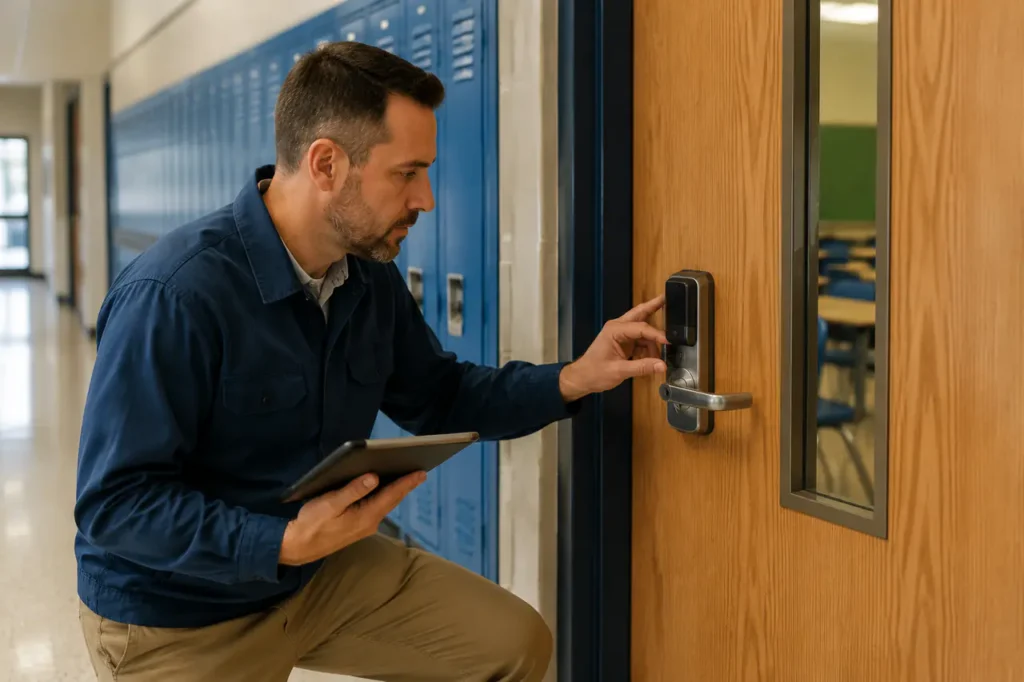
Modernizing campus access control with a smart lock for school deployment involves two very different operational problems: protecting classrooms and controlled areas while also managing high-turnover student lockers.
Treating every opening as the same can create unnecessary cost, poor user adoption, or safety issues during an emergency.
A suitable design separates door security from locker access, then connects both through an access policy that matches the school’s existing credentials, software, and operating procedures. The result may be a campus-wide system, but the hardware and security level should still reflect each zone.
The Difference Between Classroom Access Control and Smart Student Lockers
Classroom locks focus on emergency security, controlled access, and facility lockdown. Smart student lockers focus on high-volume daily use, rapid credential changes, and shared or assigned storage. The same credential may operate both, but the lock hardware, control logic, and maintenance requirements are not interchangeable.
Classroom doors commonly use commercial cylindrical or mortise preparations connected to an access-control reader, electronic lock, or electrified strike. The door assembly must support normal egress, authorized staff access, and the school’s emergency procedures.
A staff member may need access during a class, a substitute teacher may need temporary permission, and administrators may need an audit trail showing when a door was opened.
Lockers usually use compact cam locks, latch mechanisms, or deadbolt-style assemblies designed for cabinet doors rather than life-safety openings. Their priority is efficient credential management.
A student may receive an assigned locker for a term, while a gym or activity locker may be configured for shared use and reset between users.
Why the distinction matters
A classroom door is part of the building’s security and life-safety boundary. A locker protects personal property but does not control movement through the building.
Applying a residential-style device to a classroom door, or using a door-grade system for every locker, can create an unsuitable installation and an unnecessarily difficult maintenance program.
For example, a school may use RFID cards or fobs for classroom doors and staff areas, while using PIN, RFID, or mobile credentials for lockers.
The selection depends on whether lockers are assigned or shared, whether students already carry identification cards, how often credentials change, and whether the locker hardware can be connected to a central management platform.
A unified campus access-control strategy can still manage both environments. One credential directory may determine who can enter a classroom, which staff rooms are available, and which locker a student may use.
The policy should preserve separate permissions rather than giving every credential the same access everywhere.
Gove’s smart lock for maintenance access applications can also be considered for service rooms, equipment enclosures, and other areas requiring controlled access by facilities teams.
Keyless Entry Protocols: Which Technology Fits Your Campus?
RFID remains a practical standard for many K-12 environments because schools can issue and revoke cards or fobs through an existing identification process.
Mobile and biometric access may be more suitable for higher education, staff-only areas, or applications where users already rely on managed smartphones.
PIN keypads can simplify access to selected spaces, but the school must control code sharing and turnover.
| Technology | Ease of Management | Security Level | Relative Cost per Door/Locker |
|---|---|---|---|
| RFID cards or fobs | High when linked to a central credential system; cards can be issued, revoked, and reassigned | Medium to high, depending on credential controls and reader design | Low to medium |
| Mobile Bluetooth access | Convenient for managed users, but depends on phones, enrollment, and support procedures | Medium to high for controlled user groups | Medium |
| PIN keypad | Simple for selected doors or shared lockers; code changes require governance | Medium, with risk from visible or shared codes | Low to medium |
| Biometric access | Useful for restricted staff or research areas, but enrollment and privacy procedures add work | Potentially high for limited-access zones | Medium to high |
RFID school lock systems
RFID works well when the school already uses student ID cards, meal-service cards, library cards, or other campus credentials.
Lost cards can be disabled without changing a mechanical key or a code shared by many users. This makes RFID attractive for classroom doors, staff offices, and assigned lockers.
The main operational issue is card management. Students may lose, damage, or exchange cards, so the access platform needs a clear process for issuing replacements and removing old credentials.
Schools should also confirm whether the proposed reader and lock can use the credential format already supported by their campus system.
Gove’s RFID smart lock for office solutions may be relevant for staff rooms, administrative offices, and other controlled interior spaces.
Mobile, PIN, and biometric access
Mobile access can reduce the number of physical credentials, but it introduces dependence on phone ownership, battery status, application enrollment, and user support.
It may be a good fit for university housing, staff-only spaces, or temporary contractors. It is less straightforward where younger students do not carry managed smartphones.
PIN keypads are useful where a school needs keyless entry without issuing a card. They can suit shared-use lockers, storage rooms, or selected after-hours areas.
The school must decide who can create codes, how often codes change, and how to respond when a code is disclosed.
Biometrics can restrict access to sensitive areas without cards or codes, but enrollment, privacy, accessibility, and fallback access need careful review. They are generally better suited to limited user groups than to every classroom or locker on a large campus.
Wireless architecture also affects the decision. Some systems communicate through Wi-Fi, while others use a proprietary gateway or a low-power wireless network.
The correct choice depends on coverage, network ownership, battery strategy, cybersecurity requirements, and the school’s ability to support the platform.
A system that works well in a new building may be difficult to deploy across older structures with inconsistent coverage.
Keyless entry buyer checks
- Confirm which credential formats the current student ID system can support.
- Test the proposed lock with lost-card, lost-phone, and shared-code scenarios.
- Ask how temporary access is issued to substitutes, contractors, and special events.
- Verify offline behavior and the path for restoring access after a network outage.
Campus Deployment Matrix by Security Zone
Not all school zones require the same security level. Tiering the deployment can reduce unnecessary cost and improve daily movement. Classroom doors and main entrances need stronger policy control and emergency coordination than a shared-use gym locker, even when both use keyless credentials.
| Zone | Recommended Smart Lock Types | Required Security Level |
|---|---|---|
| Classrooms | Commercial mortise or cylindrical electronic locks, RFID readers, or controlled mobile access where appropriate | High; must align with egress, lockdown, staff access, and audit requirements |
| Main entrances | Managed access-control hardware with credential readers and compatible entry monitoring | High; should coordinate with visitor, reception, alarm, and emergency procedures |
| Staff offices and lounges | RFID, keypad, or mobile-enabled commercial locks selected for the existing door preparation | Medium to high; permissions should reflect staff roles and operating hours |
| Gym and hallway lockers | RFID, PIN, mobile, or other locker-specific electronic mechanisms suited to assigned or shared use | Low to medium; prioritize turnover, privacy, durability, and simple administration |
Assigned-use versus shared-use lockers
Assigned lockers can use a student-specific credential tied to a locker number and term. When the student changes lockers or leaves the school, the assignment can be removed centrally.
Shared-use lockers require a different workflow: the lock may need to accept temporary access, clear the previous user’s permission, or allow a new user to claim an available compartment.
Shared use is especially relevant in gym, athletics, performing arts, and visitor areas. The school should confirm how locker occupancy is recorded, how forgotten contents are handled, and whether staff need override access.
Consumer fingerprint padlocks and standalone combination locks may be suitable for individual purchases, but they do not provide the same centralized administration or campus reporting as a managed locker system.
Doors with different operating demands
Main entrances may require tighter scheduling, visitor control, and coordination with reception or security staff. Staff offices may need role-based access without the emergency behavior expected of classroom doors. Glass entrances, double doors, and older frames can also require different hardware interfaces.
Gove’s guidance on a smart lock for commercial glass doors can help identify interface questions before a school standardizes hardware across buildings.
Emergency Lockdowns, Safety, and Compliance Protocols
Smart locks on classroom doors must support rapid, campus-wide security procedures without preventing lawful single-motion egress. The lock, door, reader, software, and emergency controls should be reviewed as one system rather than evaluated as isolated products.
- Fail-safe behavior: A fail-safe arrangement generally releases when power is removed. This may support certain egress or emergency requirements, but the final choice depends on the opening, local code, and authority having jurisdiction.
- Fail-secure behavior: A fail-secure arrangement generally remains locked from the outside when power is lost while allowing authorized or required exit from the inside. It may suit some security boundaries, but it must not obstruct emergency egress.
- Timed locking: Automatic locking after a bell, schedule, or defined operating period can reduce reliance on staff remembering to secure doors. The school should confirm how exceptions, late arrivals, deliveries, and emergency access are handled.
- Remote lockdown: A centralized platform may allow authorized personnel to change door states or apply an emergency policy. This depends on the lock’s local behavior, network availability, control permissions, and the school’s response plan.
- Smart barricade devices: These may provide a supplemental classroom-security function, but they should not automatically be treated as a replacement for code-compliant door hardware or the school’s complete lockdown procedure.
- Free egress: NFPA requirements, ADA considerations, building conditions, and local fire marshal requirements may affect the acceptable lock, reader, door closer, and release arrangement.
- Emergency override: The project should define who can override a lock, which events trigger that action, how it is logged, and how the system returns to normal operation.
Compliance is not established by choosing a lock marketed for schools. It must be confirmed against the specific door, frame, hardware preparation, occupancy, evacuation route, and jurisdiction. A school should involve its facilities, security, IT, and life-safety stakeholders before approving a campus standard.
Integration with Student IDs and Campus Management Software
Enterprise smart locks should integrate with the school’s existing one-card student ID system wherever practical, avoiding separate databases for classroom access, lockers, and staff areas. The preferred arrangement is a shared identity source with permissions assigned according to role, zone, schedule, and enrollment status.
Integration may involve an API, directory connection, access-control platform, or a campus management system. The exact method depends on the selected vendor and the software already in use.
Before purchase, the IT team should confirm whether the platform supports the required user fields, credential formats, provisioning process, and removal of former students or employees.
The network design also matters. Wi-Fi-connected locks may be convenient where coverage and power are reliable.
Battery-operated locks using a gateway or another low-power wireless arrangement may reduce wiring requirements, but they still require suitable communication paths and a plan for offline operation.
Schools should not assume that an existing wireless network automatically provides adequate coverage inside concrete corridors, athletic facilities, or older buildings.
Pre-purchase integration checklist
- Verify the platform can read the current student ID format and directory fields.
- Confirm provisioning and deprovisioning workflows match enrollment changes.
- Check how the lock behaves when Wi-Fi, gateway, or cloud access is unavailable.
- Define what access events, battery alerts, and administrative actions must be logged and exported.
Reporting and maintenance data
A centralized dashboard can provide useful information beyond door status. Depending on the platform, administrators may be able to review access events, identify repeated denied attempts, monitor credential activity, and track battery warnings.
This supports targeted maintenance instead of relying on complaints from teachers or students.
Access logs should be governed carefully. The school must define retention, user permissions, privacy controls, and the operational purpose of reports. Battery monitoring is also part of integration planning.
A system that reports low battery status centrally is easier to maintain than one requiring technicians to inspect every locker or door manually.
For broader enterprise requirements, review the manufacturer’s approach to smart lock security standards for enterprise IoT, including credential protection, software updates, administrative access, and data handling. These questions are relevant even when the lock is installed on an interior classroom or locker.
Sourcing, Security Grants, and Vendor Selection
Upgrading school access control is a capital project that may be supported by federal, state, district, or locally administered school security grants. Funding eligibility, deadlines, matching requirements, and allowable costs vary, so the grant source should be confirmed before the hardware specification is finalized.
- Define the project boundary: Separate classroom doors, perimeter entrances, staff spaces, and lockers so the funding request reflects distinct security and operational needs.
- Document the current condition: Record existing lock types, door preparations, access-control software, network coverage, power availability, and known maintenance issues.
- Check safety and procurement requirements: Confirm applicable fire, accessibility, public-sector purchasing, cybersecurity, and data-retention requirements with the appropriate authorities.
- Compare lifecycle cost: Review hardware, credentials, gateways, software licensing, batteries, replacement parts, installation, training, and ongoing support rather than comparing the purchase price alone.
- Review retrofit compatibility: Require door schedules, locker dimensions, mounting details, strike requirements, and any exceptions for fire-rated or unusual openings.
- Test the management workflow: Demonstrate enrollment, revocation, temporary access, lost credentials, emergency override, audit reporting, and battery alerts before a full rollout.
- Clarify support terms: Compare warranty coverage, software support, service-level commitments, firmware policy, replacement procedures, and the expected hardware lifecycle.
- Plan for expansion: Confirm whether additional buildings, lockers, credentials, and administrators can be added without creating a separate system.
Vendor selection should also account for the supplier’s ability to provide consistent hardware across multiple openings and to identify exceptions early. A product may be suitable for a standard interior door but not for a double door, glass entrance, fire-rated assembly, or high-use locker bank.
Gove’s overview of smart lock manufacturers and security considerations can support early supplier comparison.
Vendor red flags to watch for
- A product line cannot cover the full range of door preparations and locker styles in the project.
- The vendor cannot explain which fire, egress, or accessibility requirements apply to the affected buildings.
- Warranty, software support, or firmware update commitments are unclear.
- The pricing model excludes ongoing license, gateway, battery, or maintenance costs needed for reliable operation.
Planning Your Campus Deployment: Next Steps and Assessments
A successful campus-wide rollout begins with a site audit that evaluates existing door hardware, locker construction, network coverage, credential systems, and emergency procedures. The audit should distinguish a retrofit from a new installation and identify buildings where a common lock standard is not practical.
Prepare these three inputs before requesting a technical review:
- Opening quantities: Count classroom doors, exterior entrances, staff rooms, and each locker group. Note assigned-use and shared-use areas separately.
- Existing systems: Identify the current access-control software, student ID format, network environment, door hardware, and any campus management platform that must remain in service.
- Deployment objective: State the desired rollout or go-live timeline, priority buildings, shutdown limitations, and whether the project will be piloted before campus-wide deployment.
Gove can use this information to shape a campus security assessment, demonstrate suitable lock categories, and prepare a volume hardware discussion.
The review should focus on system fit, not just the number of devices: which openings need high-security access control, which lockers need shared-use capability, how emergency states will operate, and what the facilities team can support after installation.
Where an existing business access-control approach is being extended into an educational facility, Gove’s smart door lock for business resources may also help frame questions about permissions, audit records, and managed access across multiple zones.
Frequently Asked Questions
Can smart locks be retrofitted onto existing classroom doors and lockers?
Many commercial smart locks offer retrofit options for standard mortise and cylindrical door preparations, and locker-specific models can replace compatible cam or latch mechanisms. However, compatibility must be checked opening by opening.
Heavy-duty or fire-rated doors may require specialized strike plates, upgraded power transfer, different door hardware, or review by the authority having jurisdiction. A door and locker schedule is normally needed before final selection.
How do facility teams manage smart lock battery life during summer breaks?
Enterprise systems can flag low batteries through centralized software, often using a configured warning level such as 20 percent. Facilities teams can then group replacements during summer or other planned downtime instead of waiting for mid-semester failures.
The maintenance plan should identify which locks report battery status, which battery types are required, and how offline or hard-to-reach units will be checked.
What happens to a school smart lock system during a power outage?
Standalone locker locks and battery-operated door locks generally retain their local credentials and can continue operating without building power, subject to the product’s offline behavior.
Hardwired networked doors may depend on backup facility generators, local battery backup, or a defined fail-safe or fail-secure arrangement. The school should test the actual emergency behavior of each door type and confirm that security objectives do not conflict with required egress.



