
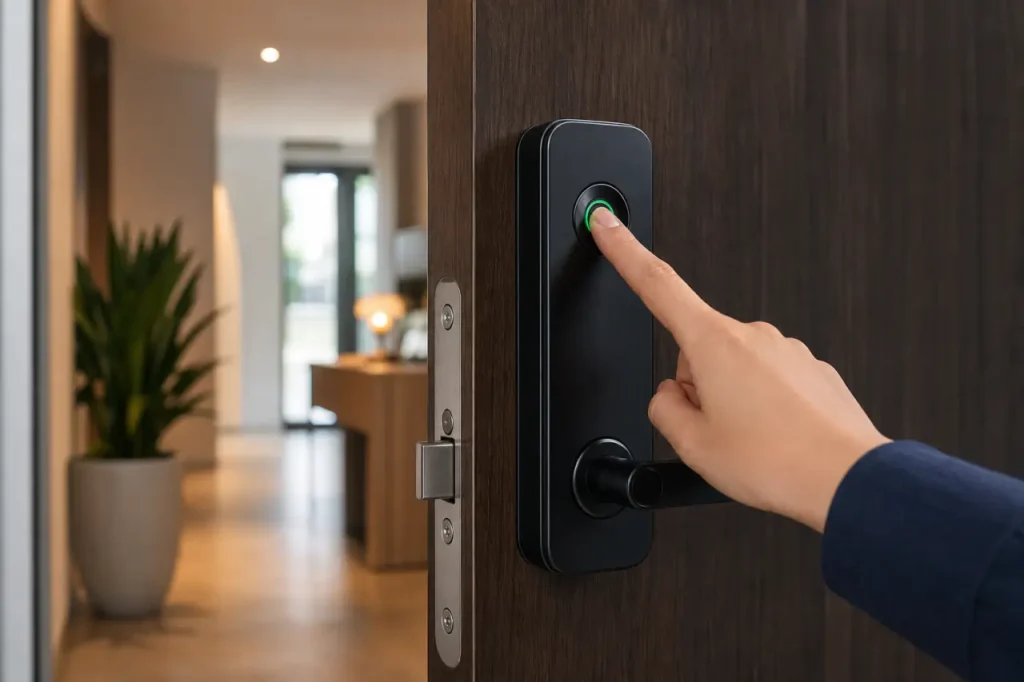
Your hands are full of groceries, the rain is starting, and your house key is buried somewhere at the bottom of a bag.
That small moment of frustration is exactly where fingerprint smart locks change the daily experience of coming home.
These keyless entry door locks replace the old key fumble with a fast biometric scan, unlocking your door the moment your finger touches the sensor.
A good fingerprint deadbolt isn’t just about skipping the key ring. Modern models pair sub-second scanner speeds with multiple backup access methods, letting you choose the most convenient way in, every time.
The real question is which combination of scanner accuracy, smart home connectivity, and physical backup works best for the door you actually have.
תכונות מפתח לחפש במנעול חכם עם טביעת אצבע
When you compare models side by side, a handful of specs directly affect daily reliability.
The best fingerprint smart locks combine recognition speeds under 0.3 seconds with at least two backup entry methods, so the lock stays useful even when your finger is wet or the battery is running low.
Look at the four areas below before checking price tags.
Biometric Scanner Speed and Accuracy
Scanner speed matters more than most buyers first realize. A lock that takes a full second to read a print feels slow every time you enter.
Most quality biometric deadbolts now scan in under 0.3 seconds, using a 3D capacitive sensor that reads the ridges below the skin surface. This sensor type cannot be fooled by a photo or a 2D printed image, which is the first real security filter.
Accuracy claims above 99% are common across major brands, but the environment still matters. Very dry or heavily calloused skin can reduce read success.
When you test the lock, try a few different finger angles before adding users, and always register your backup finger. Some models let you store over 50 unique fingerprints, giving you room for family, house guests, and a spare digit.
- Look for 0.3-second read speed or less, not just sensor resolution numbers.
- Confirm the sensor uses 3D scanning, not an optical reader that a printed image could fool.
- Register at least two fingers per person to handle wet, dry, or dirty hands comfortably.
Multi-Modal Entry (Passcodes, Keys, and Apps)
A fingerprint-only lock is risky on a rainy day or after gardening. That’s why a good smart lock with keypad adds at least two other entry channels.
You’ll want a backlit touchpad for codes you can share with dog walkers or a repair person, plus a physical backup key that works even when every electronic system fails.
The most flexible models layer a companion mobile app on top. The app lets you unlock remotely, create temporary codes that expire after a set time, and check the lock status from the office.
If you regularly manage access for cleaners, guests, or short-term rentals, look for models that let you schedule code windows and receive entry notifications.
- Verify the lock includes both a hidden physical key cylinder and a code-capable keypad.
- Check that the companion app supports temporary, one-time, and recurring passcodes.
- If you run a rental, a smart lock with audit trail features can log exactly who entered and when.
Smart Home Compatibility (Wi-Fi vs. Bluetooth)
This is where connectivity confusion lives. A Bluetooth-only lock connects to your phone when you’re within about 30 feet.
That works for local unlocking, but you’ll need a separate hub or Wi-Fi bridge if you want to lock the door from the grocery store or let a guest in remotely.
Built-in Wi-Fi smart lock integration eliminates the extra hub. You connect the lock directly to your home network, and the companion app works from anywhere without a repeater.
Some models also support Apple HomeKit, Alexa, or Google Assistant for voice commands, but always confirm that the specific smart home connectivity with HomeKit cURL Too many subrequests by single Worker invocation. To configure this limit, refer to https://developers.cloudflare.com/workers/wrangler/configuration/#limits.
cURL Too many subrequests by single Worker invocation. To configure this limit, refer to https://developers.cloudflare.com/workers/wrangler/configuration/#limits.
- cURL Too many subrequests by single Worker invocation. To configure this limit, refer to https://developers.cloudflare.com/workers/wrangler/configuration/#limits.
- cURL Too many subrequests by single Worker invocation. To configure this limit, refer to https://developers.cloudflare.com/workers/wrangler/configuration/#limits.
- cURL Too many subrequests by single Worker invocation. To configure this limit, refer to https://developers.cloudflare.com/workers/wrangler/configuration/#limits.
cURL Too many subrequests by single Worker invocation. To configure this limit, refer to https://developers.cloudflare.com/workers/wrangler/configuration/#limits
cURL Too many subrequests by single Worker invocation. To configure this limit, refer to https://developers.cloudflare.com/workers/wrangler/configuration/#limits.
cURL Too many subrequests by single Worker invocation. To configure this limit, refer to https://developers.cloudflare.com/workers/wrangler/configuration/#limits.
cURL Too many subrequests by single Worker invocation. To configure this limit, refer to https://developers.cloudflare.com/workers/wrangler/configuration/#limits.
cURL Too many subrequests by single Worker invocation. To configure this limit, refer to https://developers.cloudflare.com/workers/wrangler/configuration/#limits.
cURL Too many subrequests by single Worker invocation. To configure this limit, refer to https://developers.cloudflare.com/workers/wrangler/configuration/#limits.
- cURL Too many subrequests by single Worker invocation. To configure this limit, refer to https://developers.cloudflare.com/workers/wrangler/configuration/#limits.
- cURL Too many subrequests by single Worker invocation. To configure this limit, refer to https://developers.cloudflare.com/workers/wrangler/configuration/#limits.
- cURL Too many subrequests by single Worker invocation. To configure this limit, refer to https://developers.cloudflare.com/workers/wrangler/configuration/#limits.
cURL Too many subrequests by single Worker invocation. To configure this limit, refer to https://developers.cloudflare.com/workers/wrangler/configuration/#limits
cURL Too many subrequests by single Worker invocation. To configure this limit, refer to https://developers.cloudflare.com/workers/wrangler/configuration/#limits.
cURL Too many subrequests by single Worker invocation. To configure this limit, refer to https://developers.cloudflare.com/workers/wrangler/configuration/#limits.
cURL Too many subrequests by single Worker invocation. To configure this limit, refer to https://developers.cloudflare.com/workers/wrangler/configuration/#limits.
| cURL Too many subrequests by single Worker invocation. To configure this limit, refer to https://developers.cloudflare.com/workers/wrangler/configuration/#limits | שימוש עיקרי | קישוריות | cURL Too many subrequests by single Worker invocation. To configure this limit, refer to https://developers.cloudflare.com/workers/wrangler/configuration/#limits | קושי בהתקנה |
|---|---|---|---|---|
| cURL Too many subrequests by single Worker invocation. To configure this limit, refer to https://developers.cloudflare.com/workers/wrangler/configuration/#limits | cURL Too many subrequests by single Worker invocation. To configure this limit, refer to https://developers.cloudflare.com/workers/wrangler/configuration/#limits | cURL Too many subrequests by single Worker invocation. To configure this limit, refer to https://developers.cloudflare.com/workers/wrangler/configuration/#limits | cURL Too many subrequests by single Worker invocation. To configure this limit, refer to https://developers.cloudflare.com/workers/wrangler/configuration/#limits | cURL Too many subrequests by single Worker invocation. To configure this limit, refer to https://developers.cloudflare.com/workers/wrangler/configuration/#limits |
| cURL Too many subrequests by single Worker invocation. To configure this limit, refer to https://developers.cloudflare.com/workers/wrangler/configuration/#limits | cURL Too many subrequests by single Worker invocation. To configure this limit, refer to https://developers.cloudflare.com/workers/wrangler/configuration/#limits | cURL Too many subrequests by single Worker invocation. To configure this limit, refer to https://developers.cloudflare.com/workers/wrangler/configuration/#limits | cURL Too many subrequests by single Worker invocation. To configure this limit, refer to https://developers.cloudflare.com/workers/wrangler/configuration/#limits | cURL Too many subrequests by single Worker invocation. To configure this limit, refer to https://developers.cloudflare.com/workers/wrangler/configuration/#limits |
| cURL Too many subrequests by single Worker invocation. To configure this limit, refer to https://developers.cloudflare.com/workers/wrangler/configuration/#limits | cURL Too many subrequests by single Worker invocation. To configure this limit, refer to https://developers.cloudflare.com/workers/wrangler/configuration/#limits | cURL Too many subrequests by single Worker invocation. To configure this limit, refer to https://developers.cloudflare.com/workers/wrangler/configuration/#limits | cURL Too many subrequests by single Worker invocation. To configure this limit, refer to https://developers.cloudflare.com/workers/wrangler/configuration/#limits | cURL Too many subrequests by single Worker invocation. To configure this limit, refer to https://developers.cloudflare.com/workers/wrangler/configuration/#limits |
cURL Too many subrequests by single Worker invocation. To configure this limit, refer to https://developers.cloudflare.com/workers/wrangler/configuration/#limits
- cURL Too many subrequests by single Worker invocation. To configure this limit, refer to https://developers.cloudflare.com/workers/wrangler/configuration/#limits.
- cURL Too many subrequests by single Worker invocation. To configure this limit, refer to https://developers.cloudflare.com/workers/wrangler/configuration/#limits.
- cURL Too many subrequests by single Worker invocation. To configure this limit, refer to https://developers.cloudflare.com/workers/wrangler/configuration/#limits.
- cURL Too many subrequests by single Worker invocation. To configure this limit, refer to https://developers.cloudflare.com/workers/wrangler/configuration/#limits.
cURL Too many subrequests by single Worker invocation. To configure this limit, refer to https://developers.cloudflare.com/workers/wrangler/configuration/#limits.
cURL Too many subrequests by single Worker invocation. To configure this limit, refer to https://developers.cloudflare.com/workers/wrangler/configuration/#limits.
cURL Too many subrequests by single Worker invocation. To configure this limit, refer to https://developers.cloudflare.com/workers/wrangler/configuration/#limits.
cURL Too many subrequests by single Worker invocation. To configure this limit, refer to https://developers.cloudflare.com/workers/wrangler/configuration/#limits
cURL Too many subrequests by single Worker invocation. To configure this limit, refer to https://developers.cloudflare.com/workers/wrangler/configuration/#limits.
cURL Too many subrequests by single Worker invocation. To configure this limit, refer to https://developers.cloudflare.com/workers/wrangler/configuration/#limits.
cURL Too many subrequests by single Worker invocation. To configure this limit, refer to https://developers.cloudflare.com/workers/wrangler/configuration/#limits.
If you factory-reset the lock, the fingerprint data is wiped. Look for a biometric deadbolt security consideration if you want to double-check that the lock’s chip uses AES encryption, but overall the architecture is designed around local storage first.
Auto-lock functions close the loop. You can set the deadbolt to throw itself 10 to 60 seconds after the door closes, so even if you forget to manually lock, the door secures itself.
Combine that with an entry log in the app, and you’ll always know when the door was last used and by whom. For more detail on the encryption side, read our article on smart lock safety concerns and encryption.
- 3D capacitive sensor reads living skin, not a photo.
- Fingerprint templates stored locally on an encrypted chip.
- Auto-lock timer secures the door automatically after a set delay.
- Entry logs and notifications let you track access.
How to Install a Biometric Smart Lock (DIY Guide)
Most fingerprint smart locks are built for a straightforward afternoon install, using the same door prep as your existing deadbolt. If you can handle a Phillips screwdriver and spend 20 minutes following the manual, you can do this yourself.
Step-by-Step Installation
- Unscrew the existing interior and exterior lock hardware and slide it out.
- Check that the door strike plate lines up with the bolt and that the hole depth allows full deadbolt extension.
- Mount the new exterior scanner assembly, feeding the data cable through the door hole.
- Connect the cable to the interior mounting plate and attach the battery pack.
- Test the lock several times with the door open before closing it.
Most residential fingerprint lock models use the same standard door prep dimensions. Measure your door’s backset (2-3/8 or 2-3/4 inches) and crossbore diameter (typically 2-1/8 inches) before buying. A keyless entry door lock system that matches those measurements will install without drilling new holes.
Post-Installation Setup
Once the lock is installed and tested, open the companion app and register at least two admin fingerprints. Then add family members and any temporary users.
Set an auto-lock timer of 30 seconds to start, and adjust only after confirming the latch aligns smoothly. Taking 10 extra minutes to fine-tune the strike plate prevents future jams.
Compare fingerprint door lock options that fit your exact prep dimensions for an easier installation.
שאלות נפוצות
What happens if the battery dies on my fingerprint lock?
Most smart locks send low-battery alerts to your phone when the level drops to around 20%.
If the batteries completely die before you replace them, the lock still has a physical key override, plus an external emergency power port (usually USB-C or a 9V terminal) on the bottom of the exterior escutcheon.
Touching a portable power bank to that port gives you enough power to scan your fingerprint or enter a code and unlock the door.
Do fingerprint smart locks work with wet or dirty hands?
Capacitive sensors can struggle with heavy surface moisture or thick grease because those materials interfere with the electrical field that reads your print.
In those situations, you simply wipe your fingertip dry on your clothing and try again, or pivot to the keypad code or app unlock.
Registering a backup finger that is less calloused also increases your first-try success rate.
Can I add multiple user fingerprints for family members or guests?
Yes, almost all fingerprint smart locks let you store between 50 and 100 unique fingerprints. You manage user enrollment directly from the companion app, and you can revoke a single print without affecting others.
For guests or service providers, a temporary passcode is often faster to generate and delete than a fingerprint, and it keeps biometric storage limited to permanent household members.



